[ Graphic design ]
Typography hierarchy: set levels with ratios, then test on a phone and at 200% zoom
Hierarchy is the contrast between neighbouring levels, so set it with a ratio, not guesses. Work backwards from the body size, the largest size and the number of levels to find the ratio. Use a smaller ratio on phones, let only headings flow with the viewport, tighten leading and tracking as size grows, and test the result at 200 percent zoom.
By LAIN12 min read
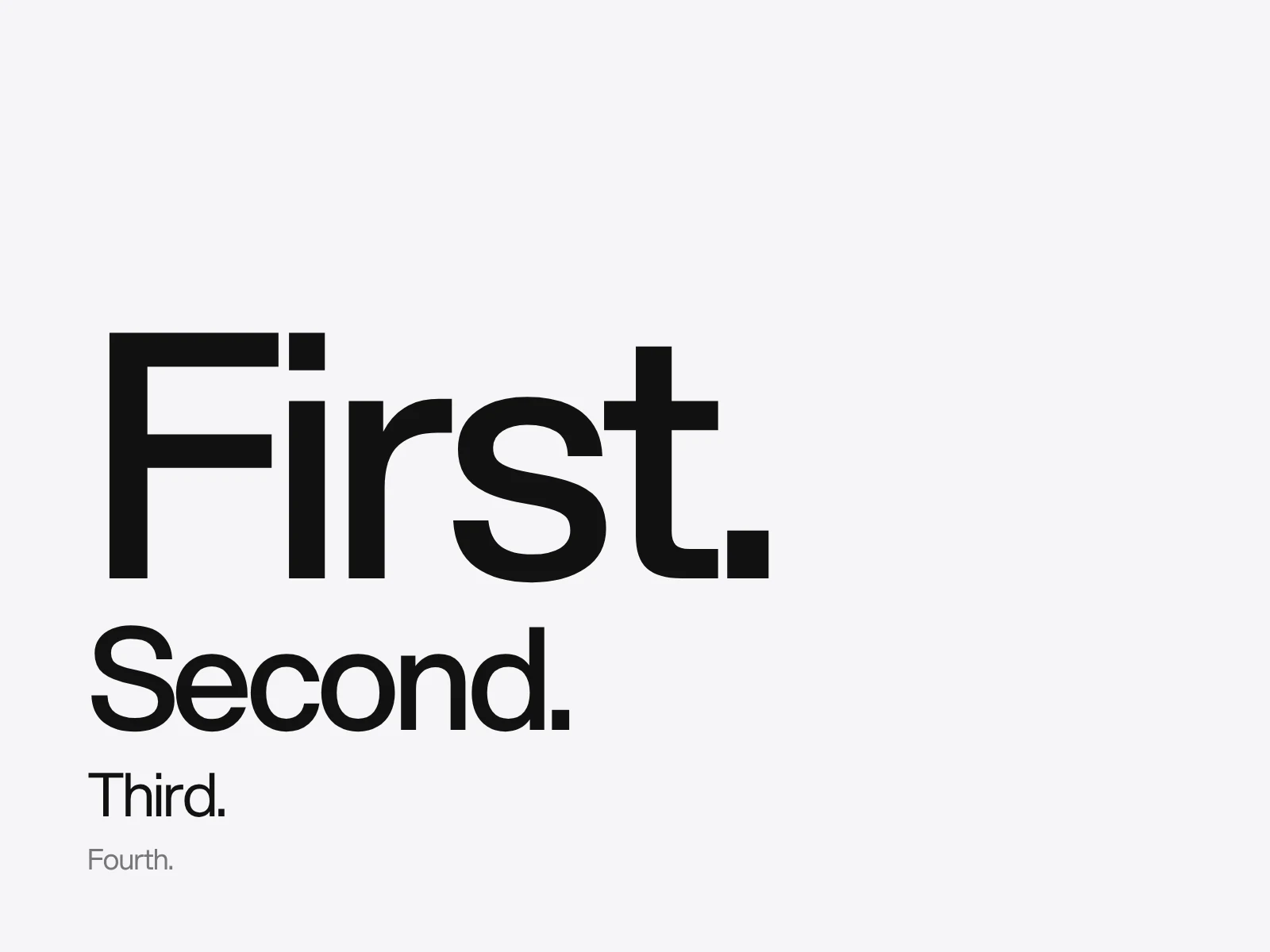
Typographic hierarchy is a set of levels that stay different from their neighbours in more than one way, on every screen and page size. Most guides stop at "use size, weight and colour". What fails in practice is how much each level differs, and whether that difference survives a phone, a zoomed browser and a printed proof. This guide gives you numbers to set and to check.
A level is contrast with its neighbour
Hierarchy is not how big the headline is. It is how different the headline is from the line below it. Check every neighbouring pair in a layout and give it a difference in at least two properties: size, weight, colour, case or the space around it. One property alone is fragile, because a single change (a smaller screen, a greyscale printout, a substitute font) can erase it.
A documented example is the type sheet on our LAGO case page. The design uses one weight of one typeface, so the hierarchy comes from size, line height and tone. The sheet lists headline 32 on 42, subheading 24 on 31, body 14 on 18, and label and button 14 on 21, with the body set a shade lighter than the headline. As neighbour ratios, the headline is 1.33 times the subheading and the subheading is 1.71 times the body. The steps are not equal and do not need to be. The body is the anchor and every size above it is a decision.
Choose the ratio by counting levels
Most guides hand you a ratio, usually 1.25, without a reason. Work backwards instead. Decide the body size, the largest size you need and how many levels sit between them, then solve for the ratio. Body 16 px, largest 48 px (three times the body) and four steps to get there: 3 to the power of one quarter is 1.316, so 1.333 fits.
The same ratio also tells you how many levels fit in a span. This table counts the steps needed to reach four times the body size:
| Ratio | Name | Steps to reach 4 times the body | Where people use it |
|---|---|---|---|
| 1.125 | Major second | 11.8 | Dense product interfaces |
| 1.2 | Minor third | 7.6 | Interfaces, long articles |
| 1.25 | Major third | 6.2 | General default |
| 1.333 | Perfect fourth | 4.8 | Editorial and marketing pages |
| 1.5 | Perfect fifth | 3.4 | Posters, display-led pages |
Sources disagree on the right-hand column. Some put editorial work at 1.333, others at 1.5, and interface guides lean to 1.125 to 1.25. Treat it as the range people use, not a standard. The mechanism is what helps you decide: a large ratio gives few usable steps, so it suits a page with few levels. A small ratio gives many steps, but neighbours that look alike, so you must add weight or space to keep them apart.
The classic print scale behaves differently. Mortensen transcribes the list from Bringhurst as 6, 7, 8, 9, 10, 11, 12, 14, 16, 18, 21, 24, 30, 36, 48, 60 and 72, and other lists leave out the 30. Neighbouring steps run from 1.09 (11 to 12) up to 1.5 (24 to 36, if you drop the 30). It is not a constant ratio. Mortensen models a clean scale as a doubling every five steps, a ratio of 1.149, and argues that the historic list departs from it and has flaws. If you pick sizes from a type menu, expect small sizes to be close together and large sizes far apart.
A fluid scale needs two ratios
One ratio cannot serve both a 320 px phone and a 1240 px desktop. At 1.333 from a 20 px base, the fifth step is 84 px. The word "Typography" is about 5.5 ems wide at an average letter width of 0.55 em, so roughly 460 px, wider than the phone screen. The fix is a smaller ratio and base on small screens and a larger pair on large ones. Utopia, the fluid scale calculator, works this way: you give a minimum and a maximum viewport, each with its own base size and ratio, and the browser interpolates between them with clamp().
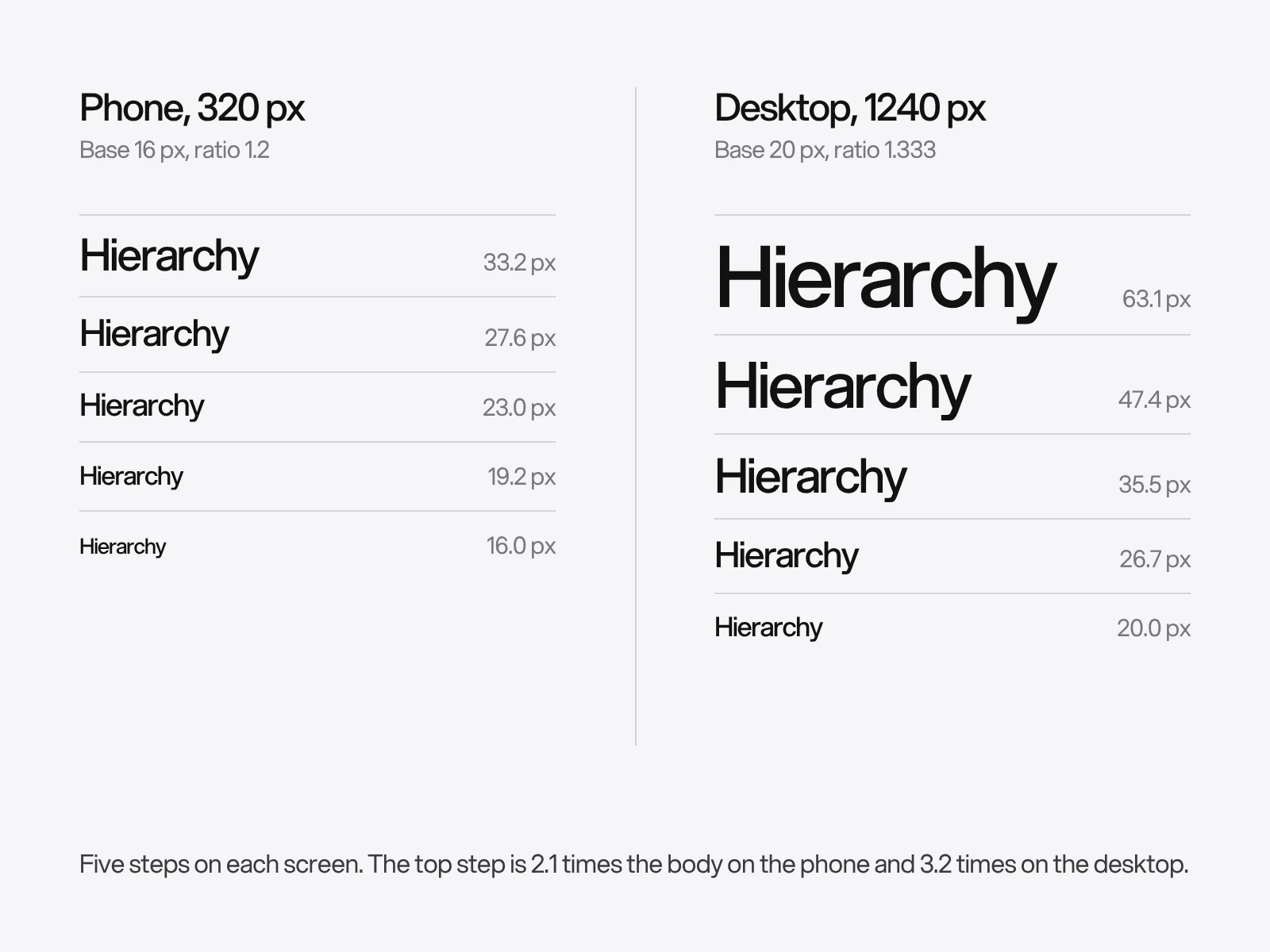
This is a constructed example (phone: 320 px, base 16 px, ratio 1.2; desktop: 1240 px, base 20 px, ratio 1.333):
| Step | Phone | Desktop | Desktop over phone |
|---|---|---|---|
| Body | 16.0 px | 20.0 px | 1.25 |
| 1 | 19.2 px | 26.7 px | 1.39 |
| 2 | 23.0 px | 35.5 px | 1.54 |
| 3 | 27.6 px | 47.4 px | 1.71 |
| 4 | 33.2 px | 63.1 px | 1.90 |
The body step becomes clamp(1rem, 0.913rem + 0.435vw, 1.25rem) and step 4 becomes clamp(2.074rem, 1.422rem + 3.258vw, 3.947rem). Notice what happens to the hierarchy. The top step is 2.1 times the body on the phone and 3.2 times on the desktop. It compresses by design, so on a phone the levels must lean harder on weight, colour and space.
The zoom trap
Fluid sizes can break text resizing. Browser zoom shrinks the viewport in CSS pixels, so a size that depends on viewport width shrinks as the reader zooms. With the example above, body text at 1240 px is 20 px. At 200 percent zoom the viewport is 620 CSS pixels, the clamp returns 17.3 px, and the text appears 34.6 px high: 1.73 times, not 2. Step 4 reaches only 1.36 times. WCAG 1.4.4 asks that text can be resized up to 200 percent without loss of content, and the W3C lists sizing text with viewport units as failure F94. Adrian Roselli argues that 200 percent is a minimum to meet, not a cap, and that users who must zoom to 500 percent to reach 200 percent will not understand why.
Opinion differs on how strict to be, because zoom behaviour depends on the browser and on whether the reader zooms the page or only the text. The safe rule, which is our reading of the numbers above and not a W3C requirement: keep body text, labels and buttons in plain rem, and let only headings flow with the viewport. They start large, so a result of 1.36 times on a 63 px headline still puts an 86 px headline on the screen. Then test at 200 and 400 percent.
Leading, tracking and optical size move with size
A hierarchy is not just sizes. Leading and tracking should change with them. Paragraphs need open leading. WCAG 1.4.12 expects content to survive a line height of 1.5 times the font size. Large headlines set that way look loose and break into separate lines. These starting values for the desktop scale above are our suggestion, snapped to a 4 px grid:
| Level | Size | Line height | Ratio | Tracking |
|---|---|---|---|---|
| Body | 20 px | 30 px | 1.50 | 0 |
| Step 1 | 27 px | 36 px | 1.33 | 0 |
| Step 2 | 36 px | 44 px | 1.22 | -0.01 em |
| Step 3 | 48 px | 56 px | 1.17 | -0.015 em |
| Step 4 | 64 px | 72 px | 1.13 | -0.02 em |
Only the direction is documented. One guide's example tightens a 96 px headline by about 1.5 percent and notes that no single rule fits every typeface. Treat the tracking column as a place to start and judge by eye. Capitals go the other way. Butterick recommends 5 to 12 percent extra letterspacing for all-caps and small-caps text, because capitals are designed to sit next to lowercase.
Check whether your font has an optical size axis before you tighten by hand. Google Fonts describes body optical sizes as having less stroke contrast, wider spacing and a taller x-height than display sizes. Browsers apply the axis automatically with font-optical-sizing: auto, but only for fonts that include it. If the display cut is already drawn tighter, negative tracking on top of it can overdo the effect. That is our inference from how the axis works, so compare with and without.
Space groups before size ranks
Proximity tells the reader which lines belong together. A heading belongs to the text after it, so the space below should be smaller than the space above. There is no standard ratio. An informal comparison of real products found about 2.2 to 3 times as much space above as below. For a 36 px heading, 48 px above and 16 px below is a 3 to 1 starting point.
Line length is a variable people over-simplify. Dyson and Kipping (1998) found that 100 characters per line was read faster than 25, with comprehension unchanged, and that about 55 was the easiest to read. Readers' own ratings did not match their measured performance. A later study with 35, 55, 75 and 95 characters found 95 fastest. Butterick suggests 45 to 90. A line of 50 to 75 characters is a safe middle, and a longer line is not an error if the leading is generous.
Audit with numbers, then with your eyes
Measure first. List every level with its size, weight, colour and spacing, then compare each pair. A pair passes if the sizes differ by at least a factor of 1.2 or if two other properties differ. That threshold is our rule of thumb, taken from the smallest steps in the classic scale. It is a prompt to look, not a law. Count the distinct size and weight pairs as well. More than five or six, and the neighbours stop reading as levels.
Then use your eyes.
- Squint or blur until the words are unreadable. The shapes that remain should be in the right order.
- Shrink it to a thumbnail. The headline should still come first.
- Turn it to greyscale. If the order depends on colour, it is fragile.
- Ask someone to point at what they see first, second and third, without explaining the page.
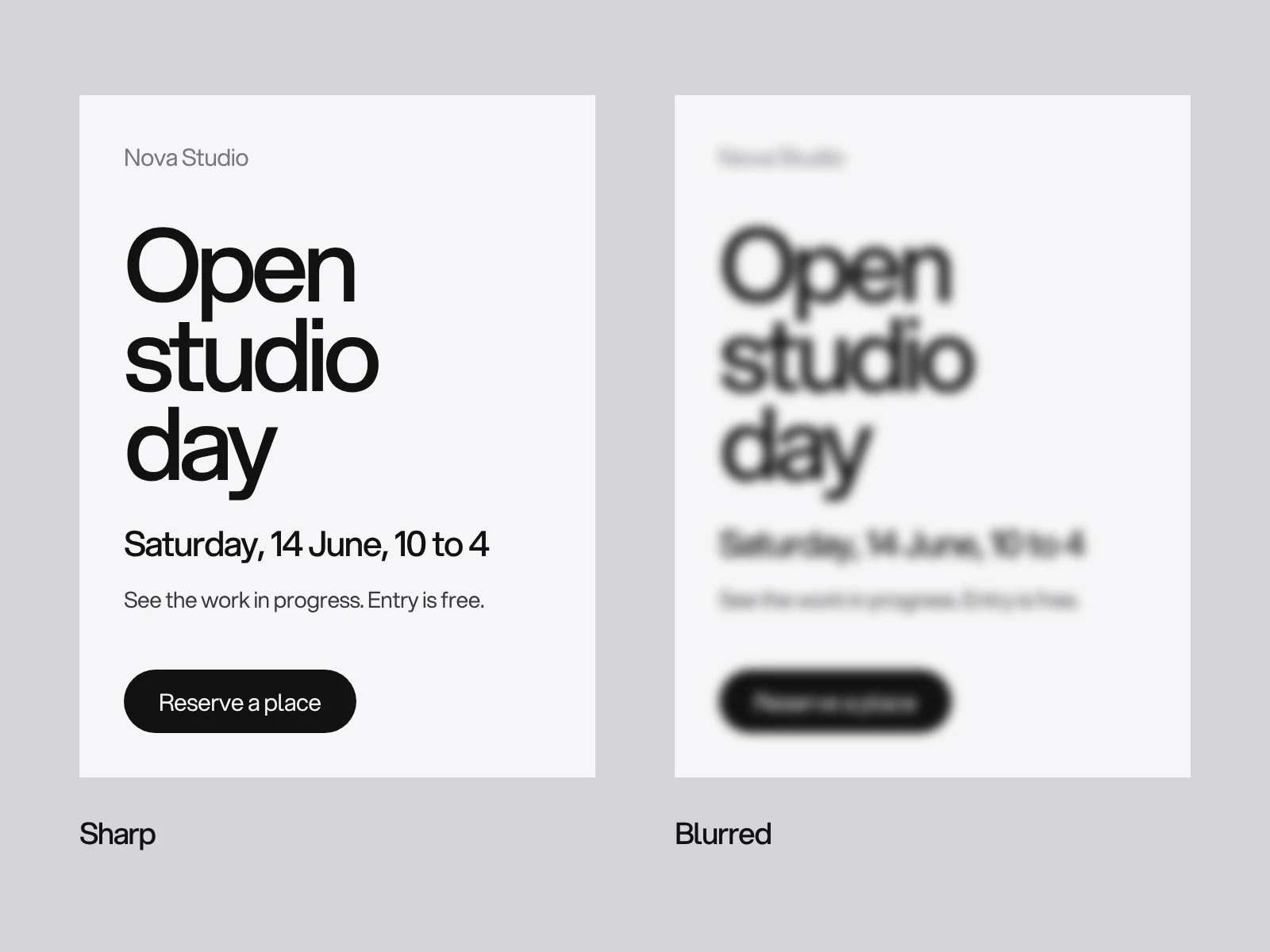
Check the smallest text against reading research. Legge and Bigelow reviewed print-size studies and found that reading speed stays at its maximum across about a tenfold range of x-height, from roughly 0.2 to 2 degrees of visual angle. At a reading distance of 40 cm that is an x-height of about 1.4 mm to 14 mm. For a typeface whose x-height is half its size, that is roughly 8 to 80 points. The finding applies to readers with normal vision, and your reader may hold the page nearer or farther away. Body text below that range slows people down. Headlines above it are mostly scanned, not read line by line.
Where hierarchies fail, and why
- The levels differ only in size. On a phone the ratio shrinks, the sizes converge and the order blurs. Detect it by viewing at 390 px. Fix it by adding weight, colour or space that does not compress.
- Tokens are named by size. A style called text-20 is wrong the day the scale changes. Name styles by role, such as display, title, body and label. Apple's guidelines pair size and weight in named text styles that scale with Dynamic Type and adjust leading when a weight changes.
- Grey text pushes back too far. A grey of #767676 on white measures 4.54 to 1, which passes. The same grey on a #f6f6f7 page measures 4.21 and fails the 4.5 to 1 minimum for normal text. #999999 on white is 2.85. Always measure against the real background.
- Viewport-only sizes. They cause the zoom shortfall above.
- Fixed-height boxes. WCAG 1.4.12 expects line height of 1.5, paragraph spacing of twice the font size, and extra letter and word spacing without loss of content. A box with a fixed height clips the text when a reader applies them.
- Everything is emphasised. If four levels are bold, bold no longer separates any of them.
Pass or fail checklist
- Can you say the reading order in one sentence?
- Does each neighbouring pair differ in two properties?
- Was the ratio chosen from the levels you need?
- Do the phone and desktop scales use their own ratios?
- Are body text and buttons in
remwith no viewport term? - Does body text work at 200 percent zoom without clipping?
- Do leading and tracking fall as size rises?
- Does every text colour pass 4.5 to 1 on its real background?
- Does the order survive a blur and greyscale?
Write the result once, with sizes, weights, spacing and roles, in your brand guidelines so every poster, deck and page uses the same ladder. The font itself is a separate decision, covered in choosing brand colours and fonts. The identity chapters of Ordin, which has a typography board, and Lima AI, whose type sheet pairs a grotesk for the words with a mono for the labels, show the same idea: the type system is written down next to the palette.
Your next step
Take your most important page, list its levels and run the pairwise check. Graphic design at LAIN, such as decks, brochures and posters, typically takes 2 to 4 weeks. If your materials look busy and you are not sure why, start a project and we will review the hierarchy with you.
Frequently asked questions
What type scale ratio should I use?
Choose it by counting levels. The ratio is the largest size over the body size, raised to the power of one over the number of steps. Body 16 px to a 48 px heading in four steps gives 1.316, so 1.333 fits. Interface guides lean to 1.125 to 1.25 and editorial guides to 1.333 or 1.5, but sources disagree.
How do I make a type scale responsive without breaking zoom?
Use a smaller ratio and base on small screens and a larger pair on large screens, interpolated with clamp(). Keep body text, labels and buttons in rem with no viewport term, and let only headings flow. The W3C lists viewport-unit text sizing as failure F94, so test at 200 and 400 percent zoom.
What line height should headings use?
Lower than body text. Body needs about 1.5 and should survive 1.5 under WCAG 1.4.12. Headlines usually look better between about 1.1 and 1.3, tightening as the size grows. These are starting values, not rules, so check by eye in your typeface.
How long should a line of text be?
About 50 to 75 characters is a safe middle. Butterick suggests 45 to 90. Dyson and Kipping found 55 easiest to read but 100 read faster than 25, and another study found 95 fastest. Performance and preference did not agree, so leading and the audience matter.
Can I use grey text to make a level less important?
Yes, if it still passes WCAG contrast of 4.5 to 1 against its real background. Grey #767676 passes on white at 4.54 but fails on a #f6f6f7 page at 4.21. Measure each text colour on the surface it sits on.
What is the smallest readable text size?
Legge and Bigelow found that reading speed is at its maximum for x-heights from about 1.4 mm to 14 mm at 40 cm for readers with normal vision. At a typical x-height of half the type size that is roughly 8 to 80 points. Your reader may hold the page nearer or farther away, so test on the real medium.
Sources and fact check
Facts in this article that come from outside LAIN were checked on 28 Oct 2026 against:
- Spencer Mortensen: The typographic scale
- Utopia: Fluid type scale calculator
- npm: utopia-core
- W3C: Understanding SC 1.4.4 Resize Text (WCAG 2.2)
- Adrian Roselli on the W3C CSS mailing list, December 2025
- Butterick's Practical Typography: Letterspacing
- Butterick's Practical Typography: Space above and below
- Butterick's Practical Typography: Summary of key rules
- Google Fonts Knowledge: Optical size axis
- Legge and Bigelow (2011): Does print size matter for reading?
- Wikipedia: Line length
- Embry-Riddle: The effects of line length on reading performance of online news articles
- XWiki forum: Headings and Open Sans (informal comparison of heading spacing)
- W3C: Understanding Text Spacing (WCAG 2.2)
- W3C: Understanding Contrast (Minimum) (WCAG 2.2)
- Apple: Human Interface Guidelines, Typography
- Web Designer Depot: The designer's guide to letter-spacing
Timelines, services and process described here are LAIN's own, as set out on our About and FAQ pages.


[ Keep reading ]