[ Website ]
Website maintenance checklist: catch the failures that show no error
The failures that cost most do not show an error page: a dead form, a lapsed renewal, a robots.txt that stopped answering, a backup that cannot restore. Test the function, not the page, put expiry dates and form tests under automatic alerts, and send those alerts to an address that does not depend on the domain.
By LAIN12 min read
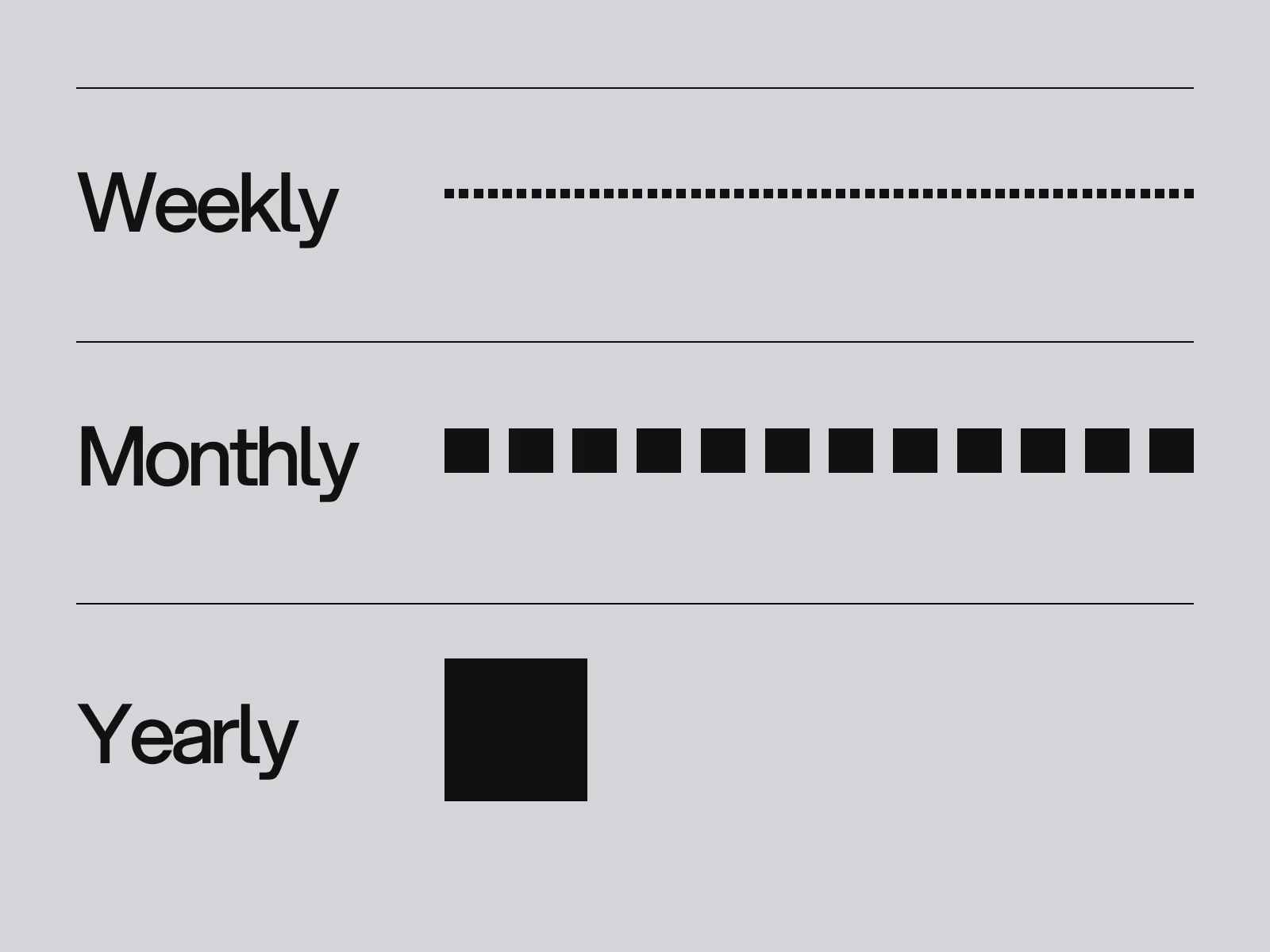
Most advice on website maintenance is a calendar: weekly, monthly, yearly. The calendar is fine, but it hides the useful question, which is how does each failure announce itself? Most of the expensive ones do not. The page still loads, the server still answers with a normal status, and nobody is told. So this checklist is built around five silent failures, then turned into a routine with a pass criterion for every line.
The five failures that make no noise
| Failure | Why nothing alerts you | What catches it |
|---|---|---|
| A form that no longer delivers | The page works and the visitor sees "thanks" | A test submission on a schedule, sent to a mailbox that confirms arrival |
| A renewal that lapsed | The date was stored in one person's head | Expiry monitors, with alerts at a fixed distance before the date |
| A robots.txt or sitemap that errors | The pages still load for people | A check on those two files, not on the home page |
| A record or script that points at something you no longer control | It works until someone else claims it | An inventory of DNS records and third-party scripts |
| A backup that restores the wrong scope | Nobody has ever restored it | A restore to a test copy, with a written pass criterion |
The rest of the article takes them in turn, with the numbers that decide how quickly you must act.
Forms: test the delivery, not the page
A form has four parts that can fail independently: the page, the submission handler, the email that carries the message, and the inbox. Only the first is visible to you.
Two documented causes are worth knowing. Email authentication: Google's sender guidelines require the From domain to align with the domain that passes SPF or DKIM (a hard rule for bulk senders) and tell every sender not to impersonate other domains. A contact form that sends a notification *from the visitor's address* looks exactly like that to a mail server, and the message can land in spam or be refused. Send from your own domain and put the visitor in Reply-To. Website forms that convert covers the setup.
Expired access: if a form feeds a spreadsheet or inbox through a connection you built on your own Google Cloud project, Google's OAuth documentation lists the ways a refresh token stops working. It is revoked, it goes unused for six months, the account password changes while Gmail scopes are in use, or the project's consent screen is still in "Testing" status, which expires tokens after 7 days. The form keeps accepting entries. The pipeline behind it is dead.
Pass criterion: a test entry with a unique subject line reaches the right inbox, not spam, within 10 minutes, every week. If you cannot test weekly, test after any change to email, DNS or the form.
Domains: the real expiry timeline
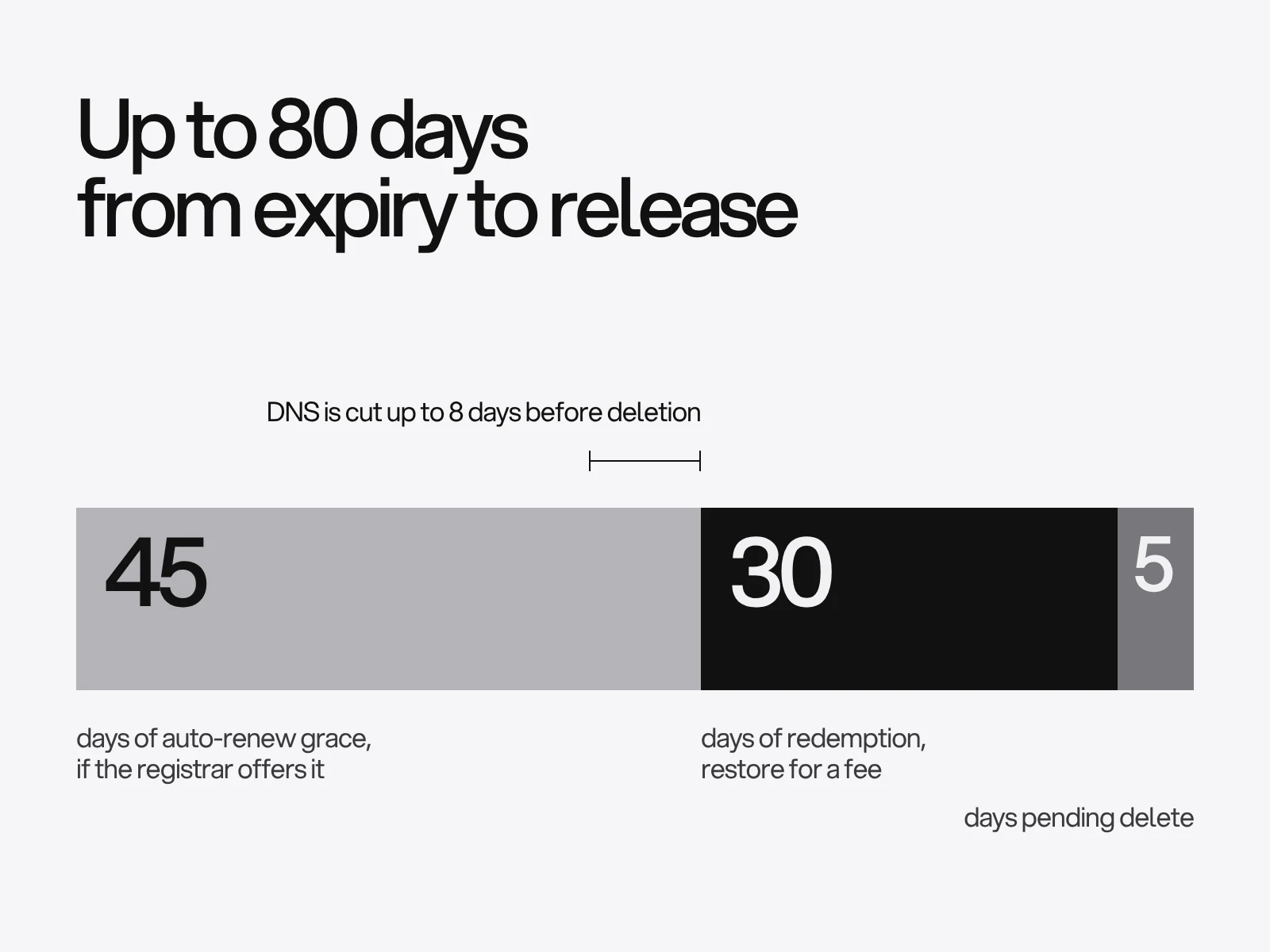
Registrar guides give timelines of 60 to 90 days after expiry, and they disagree because the stages are partly the registrar's choice. ICANN's Expired Registration Recovery Policy fixes the parts that are not:
- The registrar must send reminders about one month and about one week before expiry, and at least one more within 5 days after.
- A generic TLD registry must offer a 30-day redemption grace period after deletion. The domain cannot be transferred in that window, and the owner can restore it, though the registrar may charge a fee.
- The registrar must disrupt the domain's DNS for up to 8 days before deleting it, so websites and email stop first.
- An auto-renew grace period before deletion is optional. If offered it lasts 1 to 45 days.
Add the roughly five days of "pending delete" that registrar guides describe, and the longest path from expiry to a name anyone can register is 45 + 30 + 5 = 80 days. Country domains such as .uk or .de follow their own rules, so check the registry for yours.
The practical lesson is about the reminders. They go to the registrant contact. If that mailbox is on the domain that is expiring, the warning is routed through the thing about to stop working. Use an address on a different domain, and make sure the card on file is not the one that expires first.
Certificates: lifetimes are shrinking
Browser-trusted TLS certificates are on a fixed countdown. CA/Browser Forum ballot SC-081v3, proposed by Apple and endorsed by Google Chrome, Sectigo and Mozilla, cuts the maximum validity from 398 days to 200 days on 15 March 2026, 100 days on 15 March 2027 and 47 days on 15 March 2029. Reuse of domain validation shrinks to 10 days by 2029. Some authorities issue 199 days to leave a margin.
Two things change for a small site. If your host renews certificates, nothing: the renewals just become frequent. If you manage a certificate yourself, a manual renewal every 47 days is not realistic, so automate it. And do not count on the issuer to warn you: Let's Encrypt stopped sending expiry emails on 4 June 2025, citing the privacy cost of holding addresses, running cost and complexity, and points to third-party monitoring instead.
An alert should fire while there is still time to fix a broken renewal. This is our own rule of thumb, not a standard: alert at 20 percent of the lifetime remaining, never fewer than 7 days.
| Certificate lifetime | Alert when this many days remain | Days left to fix it by hand |
|---|---|---|
| 200 days | 40 | 40 |
| 100 days | 20 | 20 |
| 47 days | 10 | 10 |
If your client renews with a third of the life left (an assumption, so check yours), that is about 67, 33 and 16 days remaining. The alert then fires well after a renewal should have happened, which is the point: it only speaks when automation has failed.
Monitoring: how fast is "fast enough"?
Free uptime tools check every 5 minutes. That is not your detection time. A good monitor re-checks a failure from other locations before it alerts, and OnlineOrNot's documentation puts the worst case for a 5-minute interval at about 10 minutes, because of that confirmation. Sentry's default waits for three consecutive failures, which pushes the figure higher. Check your own tool's retry setting before you trust a number.
Whether that matters depends on your promise to visitors. Allowed downtime per 30-day month: 99.9 percent is 43.2 minutes, 99.95 percent is 21.6 and 99.99 percent is 4.3. A 10-minute detection delay on one outage uses about 23 percent of a 99.9 percent monthly budget before anyone has started fixing anything. For a brochure site that is fine. For a booking or checkout page, check more often and alert more than one person.
Page-level monitors have a blind spot: they pass when the server answers 200. Set at least these monitors:
- A keyword check for a phrase that only appears when the page has rendered fully, such as the footer address, not "html".
- Expiry monitors for the domain and the certificate. UptimeRobot's free plan lists an SSL and domain expiry monitor, though its pricing page contradicts itself on whether SSL monitoring is free, so test it.
- A check on
/robots.txtand the sitemap. Google's documentation says that if robots.txt returns a server error it stops crawling the site for 12 hours, then uses its last good copy for up to 30 days, then behaves as if there were no file. A broken file on a quiet Sunday is invisible to people and decisive for crawling.
Backups: define the scope before you test the restore
CISA's guidance is 3 copies, 2 kinds of storage, 1 copy off-site, automatic and regular, with recovery tests that cover full and partial restores. For a website the harder part is what each copy contains.
A platform restore usually rolls the *whole project* back to an earlier state. A summary of Webflow's help centre describes restore points that paid plans keep without limit, and community guides say there is no restoring a single page or item, so duplicate a page before you experiment on it. Secondary guides also say CMS content is not fully covered and is best exported to CSV, with the images downloaded separately. We could not read Webflow's help pages from our research environment, so check your own platform's page for what it holds.
Things a site backup rarely contains, and that you need to rebuild after a loss:
- The DNS zone. Export it as text. Without it, restoring the site does not restore the email.
- Form submissions and anything in third-party tools.
- The list of scripts and integrations, including the analytics and tag-manager configuration.
- Originals: photography, brand files, design files.
Pass criterion for a restore test: from a copy with no access to the live site, someone who did not build it gets a working home page and one form in under two hours using only the written notes. Do it twice a year, not on the day you need it.
Scripts, DNS and access: remove what you no longer control
In February 2024 a company bought the polyfill.io domain and its GitHub account. In June 2024 Sansec reported malicious code served from it to more than 100,000 websites. It redirected mobile visitors, ran only at certain hours and skipped admins, so owners were unlikely to see it. The original developer had said no site needed that script. Every third-party script is a dependency that can change owners, so list them and delete the ones nobody can justify.
DNS has the same shape. A CNAME that points to a service you cancelled is a "dangling" record, and anyone who registers that name on the service can serve content on your subdomain. Microsoft's guidance says to delete the record when you retire the resource, and to reverse the order when you provision: claim the host first, add the DNS record last. Cookies scoped to the parent domain can be readable by the hijacked subdomain.
For WordPress sites, Patchstack's security report page says 33 percent of the vulnerabilities in the WordPress ecosystem receive no patch at all. A plugin whose author has gone cannot be updated out of trouble: replace it.
The routine with pass criteria
| When | Check | Pass if |
|---|---|---|
| Weekly | Open home and one inner page on a phone | Layout intact, no missing images, loads in a few seconds on mobile data |
| Weekly | Test entry through every form | Arrives in the right inbox within 10 minutes |
| Weekly | Look at the uptime monitor and search enquiries | No unexplained dip |
| Monthly | Updates, links, access list | No pending security updates, no broken internal links, no former staff with access |
| Monthly | Search Console Pages and Security issues reports | No new server errors, no security issue listed |
| Quarterly | robots.txt, sitemap, DNS zone export | Files answer 200, zone export saved |
| Twice a year | Restore test | Pass criterion above met |
| Yearly | Domain, card, certificate path, content | Expiry 60 or more days away, auto-renew on, card valid past the expiry |
Google says a security review after cleaning a hacked site can take from a few days to a few weeks, so a monthly look at the Security issues report is cheaper than finding out from a visitor's browser warning.
Where this goes wrong
- The alert goes to a person who left. Cause: the monitor was set up under one account. Fix: alerts go to a shared address on a different domain, and two people receive them.
- Auto-renew is on, but the card expired. Cause: auto-renew only works if payment succeeds. Fix: review the card against the expiry date yearly.
- Everything is monitored, nothing is tested. Cause: uptime tools check the server, not the function. Fix: one keyword check and one form test per week.
- The restore test is skipped because the platform "has backups". Cause: the backup exists but nobody knows its scope. Fix: write down what is outside it.
- The only copy of the logins lives in one browser. Fix: a shared password manager and two-step verification on the registrar and email first, because they can reset everything else.
The final phase of a website project at LAIN covers handover and launch, so ask for the list of where the domain, hosting and accounts live and who holds them. The list is the same for a wealth manager's site like StoneHaven and a construction firm's like GravixPoint. If your site needs more than upkeep, send us a brief. If the site is being replaced, the redesign SEO checklist covers what to protect, and the Core Web Vitals guide covers speed.
Frequently asked questions
How often should a website be maintained?
Test forms and open key pages weekly, review updates, links, access and Search Console monthly, restore a backup twice a year, and check the domain, payment card and certificate path yearly. The schedule matters less than having alerts for expiry and for form delivery, because the costly failures show no error.
What happens if my domain expires?
ICANN rules require registrars to disrupt the domain's DNS for up to 8 days before deleting it, so the site and email stop first. A generic domain then has a 30-day redemption period in which the owner can usually restore it for a fee. An optional auto-renew grace of 1 to 45 days and about 5 days of pending delete mean the longest path to release is roughly 80 days. Country domains differ.
How often do SSL certificates need renewing now?
Browser-trusted certificates are capped at 200 days from 15 March 2026, 100 days from 15 March 2027 and 47 days from 15 March 2029. If your host manages certificates, renewal is automatic. If you manage one yourself, automate it, and add an expiry monitor because Let's Encrypt stopped sending expiry emails in June 2025.
Why did my contact form stop sending emails?
Common causes are a notification sent from the visitor's address instead of your own domain, which fails the sender checks that Google and other providers apply, a connection whose access token expired or was revoked, a full or changed inbox, and the message landing in spam. Test with a unique subject line weekly, and after any change to email or DNS.
Are uptime monitors enough to protect a website?
No. They check that the server answers, usually every 5 minutes, and a confirmed alert can take about 10 minutes. They do not know whether a form delivers, a renewal is due or robots.txt is failing. Add a keyword check, domain and certificate expiry monitors, a check on robots.txt and a weekly form test.
What should a website backup include?
The platform backup, a separate export of content and form submissions, a text copy of your DNS zone, the list of scripts and integrations, and your original files. Follow 3 copies, 2 kinds of storage, 1 off-site, and prove it by restoring to a test copy using only written notes.
Sources and fact check
Facts in this article that come from outside LAIN were checked on 28 Oct 2026 against:
- ICANN: Expired Registration Recovery Policy, what registrants should know
- CA/Browser Forum: Ballot SC-081v3, reducing validity and data reuse periods
- DigiCert: TLS certificate rule changes, 199, 99 and 47 day stages
- Let's Encrypt: Ending expiration emails
- Google Search Central: How Google interprets the robots.txt specification
- Google Workspace Admin Help: Email sender guidelines
- Google for Developers: Using OAuth 2.0 to access Google APIs, refresh token expiry
- CISA: Back up business data
- OnlineOrNot docs: How uptime monitoring works
- Microsoft Learn: Prevent dangling DNS entries and avoid subdomain takeover
- BleepingComputer: Polyfill.io JavaScript supply chain attack impacts over 100K sites
- Google Search Console Help: Security issues report
- Sentry docs: Uptime monitoring, three consecutive failures by default
- Patchstack: Security analysis and insights from WordPress vulnerabilities
- UptimeRobot: Pricing and plan features
Timelines, services and process described here are LAIN's own, as set out on our About and FAQ pages.
[ From our work ]



[ Keep reading ]