[ Website ]
Core Web Vitals explained: how they are measured, where sites fail and what to fix first
Core Web Vitals are judged on real Chrome visits at the 75th percentile over 28 days, and a page group takes its worst metric. On mobile only 48% of sites pass all three, mostly through slow LCP (62% good) and INP (77% good). Find which LCP part is slow before changing anything.
By LAIN10 min read
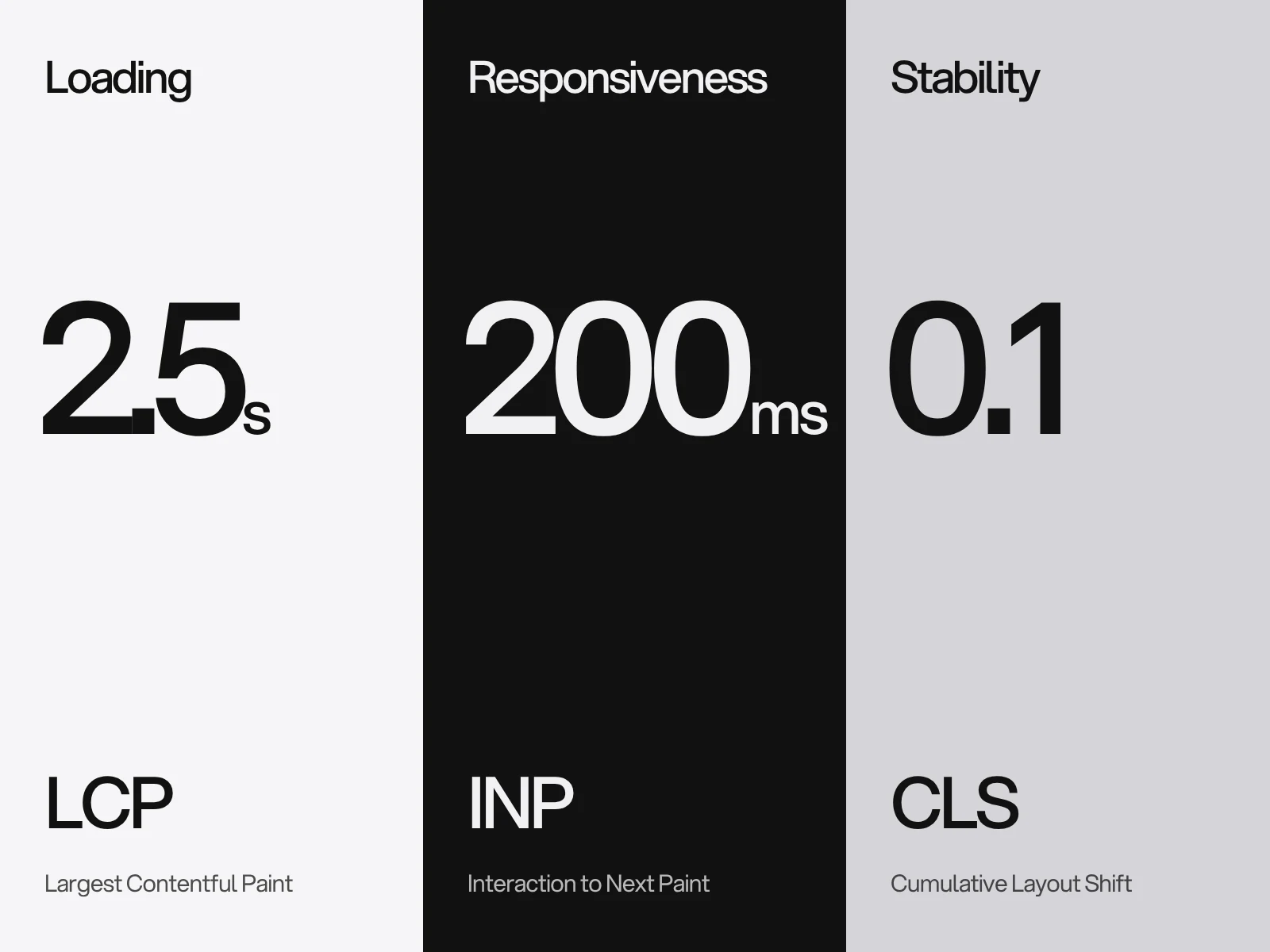
The three numbers are simple to state and easy to misread. LCP should be 2.5 seconds or less, INP 200 milliseconds or less and CLS 0.1 or less, each at the 75th percentile of real visits. What the summaries skip is how the data is collected, which part of a slow LCP is actually slow, and how a layout shift is calculated. Those three things decide what you fix, and in what order.
Where real sites fail
The HTTP Archive Web Almanac 2025 (July 2025 data) measured how many sites get a "good" rating:
| Metric | Mobile good | Desktop good |
|---|---|---|
| LCP, loading | 62% | 74% |
| INP, responsiveness | 77% | 97% |
| CLS, stability | 81% | 72% |
| All three | 48% | 56% |
Three things stand out. Mobile is the problem for LCP and INP: the median mobile Total Blocking Time was 1,916 ms against 92 ms on desktop. INP is almost solved on desktop and far from it on phones. And CLS is worse on desktop, which we could not explain from the data. If your visitors are mostly on phones, loading and interaction work come before layout stability.
How Google reads the numbers
- Field data, not your test. The numbers come from the Chrome User Experience Report. It includes Chrome on desktop (Windows, macOS, ChromeOS, Linux) and on Android, from users who share usage statistics and sync history. It excludes Chrome on iOS, WebView and other Chromium browsers such as Edge. A design aimed at iPhone users is being judged on a sample that leaves most of them out.
- A rolling 28 days. Search Console, PageSpeed Insights and the CrUX API use a 28-day rolling average, updated daily. A fix therefore shows up gradually as old visits roll out, and Search Console's validation runs for 28 days.
- The worst metric wins. Search Console groups URLs with a similar experience, and a group takes its slowest status. A group needs enough data for both LCP and CLS to appear. Where there is not enough, it falls back to the origin. A site with little traffic may have no field data at all, and then only lab tools apply.
- The thresholds are pragmatic, not ideal. Google's own write-up says research points to about 100 ms for INP, but 200 ms was chosen because it is achievable. For LCP, 1.5 and 2 s were not consistently achievable for top sites, so it chose 2.5 s. For CLS, 0.1 was chosen over 0.05 because of third-party embeds. "Good" is a floor to clear, not a finish line.
- Ranking. Google says Core Web Vitals align with what its core ranking systems seek to reward, and advises you to strive for the thresholds. It publishes no weighting and does not require a perfect score. Third-party correlation studies date from 2021 and 2022, before INP existed.
Lighthouse is a lab tool and does not measure INP. Its score weights LCP 25%, Total Blocking Time 30%, CLS 25%, First Contentful Paint 10% and Speed Index 10% (Lighthouse 10). A green Lighthouse run and a failing field report can both be right.
LCP: find which of four parts is slow
The LCP time is the sum of four parts, and web.dev gives a rough ideal split.
| Part | Ideal share | Of a 2.5 s budget |
|---|---|---|
| Time to first byte | about 40% | about 1.0 s |
| Resource load delay | under 10% | about 0.25 s |
| Resource load duration | about 40% | about 1.0 s |
| Element render delay | under 10% | about 0.25 s |
web.dev calls these guidelines and advises against treating them as absolute times. Their value is in showing which part is out of proportion. Most advice only addresses the third row, image size. In the Almanac data the other rows are where visible mistakes cluster.
Load delay is the gap before the image is even requested. It should start at the same time as the page's first resource. Roughly 16 to 17% of pages lazy-load their LCP image, a share unchanged since 2024, and each one adds delay by design, since the browser waits to learn the image is on screen. Only about 17% of mobile pages mark the LCP image fetchpriority="high" and about 2% preload it. An image set in CSS or injected by script is found later still, and needs a preload with high priority. Use fetchpriority="high" on one or two images at most, or it stops helping. Chrome's guidance reports Google Flights improving LCP from 2.6 s to 1.9 s with it.
Load duration is bytes over bandwidth. Lighthouse's mobile profile moves 1.6 Mbps with 150 ms round trips and a 4x CPU slowdown, which is about 200 KB per second before latency. A 600 KB hero image then costs 3 seconds of transfer alone. Real visitors vary, so this is a stress test, not your audience. The image is the LCP element on 76% of mobile pages, and among those images 57% are JPEG, 26% PNG and 11% WebP, so format and dimensions are the first lever.
Render delay hides in design choices. Chrome does not count an element at opacity 0 as an LCP candidate, so in our reading an intro that holds the hero invisible until a script runs moves the LCP to when it first appears. Full-viewport background images are excluded as likely backgrounds, and SVG elements are not candidates. A video counts by its poster or first frame, whichever is earlier. Measurement stops at the first tap, scroll or key press. Web fonts add to text LCP: font-display: optional avoids a late swap, swap suits distinctive brand type if it arrives early, and preloading takes bandwidth from other resources.

CLS: the arithmetic
A layout shift scores impact fraction times distance fraction. Impact is the share of the viewport covered by the unstable elements across both frames, and distance is the largest move divided by the larger viewport dimension. Shifts group into session windows of at most 5 seconds with under 1 second between shifts, and CLS is the worst window, not the sum. Shifts within 500 ms of a tap, click or key press are excluded, and a page restored from the back-forward cache starts again at zero.
Worked example: on a 1440 by 800 screen a 120 px cookie banner is inserted above content that fills 680 px of the viewport.
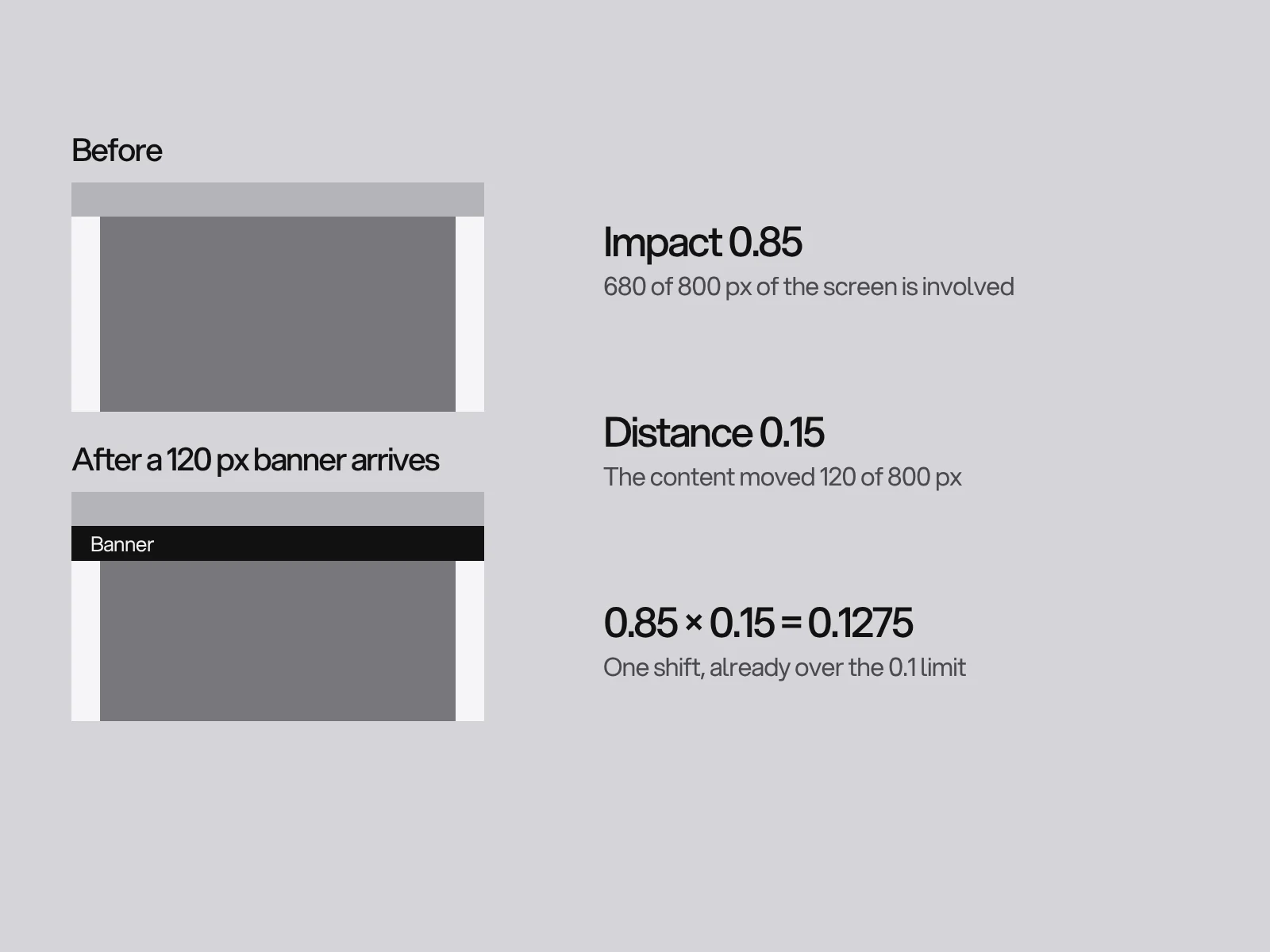
That single shift fails the metric. For content filling this much of the screen, a shift stays under 0.1 only below roughly 94 px, since (0.1 ÷ 0.85) × 800 ≈ 94. On a 390 by 844 phone, with content starting 150 px from the top, the same 120 px gives 0.117 and 60 px gives 0.059.
What follows:
- Reserve the space with width and height or an aspect ratio on every image, video and embed.
- Cookie notices: web.dev says a notice inserted after render pushes content down. Reserve its space, or show it as a sticky footer or modal overlay, which shifts nothing. On mobile a long notice can itself become the LCP element.
- Fonts:
size-adjustlimits the jump between the fallback and the web font.
INP: the slowest interaction counts
INP records clicks, taps and key presses (not hover or scrolling) and reports one value, usually the worst; on pages with many interactions it ignores one of the worst for every 50. An interaction has three parts: input delay (the main thread is busy), processing (your handlers) and presentation delay (rendering the result). Interactions inside iframes count, though the browser does not report them to the parent page, which is one reason field and RUM numbers can differ.
- Input delay is mostly other people's code: every tag, chat widget and consent script runs on the same main thread. Remove what nobody reads and delay the rest.
- Processing is yours. Break long handlers up so the browser can paint.
scheduler.yield()is in Chrome and Edge 129 and Firefox 142 but not Safari, so feature-detect it and fall back tosetTimeout, accepting that the continuation is no longer prioritised. - Presentation delay grows with DOM size and rendering work. Flatten the DOM, avoid reading layout after writing styles in one task, and use
content-visibilityfor off-screen sections.
A diagnosis order that saves time
| Symptom | Check first | Usual cause |
|---|---|---|
| LCP slow, large first-byte share | The LCP breakdown in DevTools' performance panel | Hosting or caching, not the front end |
| LCP slow, long gap before the image request | Resource load delay | Lazy-loaded or script-injected hero, no fetchpriority |
| LCP slow, image downloads for a long time | Resource load duration | Oversized dimensions or the wrong format |
| LCP slow, image arrived early | Render delay | Font loading, text rendered by script, hero held at opacity 0 |
| CLS above 0.1 | Layout Shift regions in DevTools | Images without size, late banners, font swap |
| INP above 200 ms | Which of the three parts is long | Third-party scripts, long handlers, large DOM |
Where this goes wrong
- Trusting the lab over the field. A fixed throttled device and a clean browser differ from the 75th percentile of real Chrome visits. Start from the field report and use the lab only to find causes.
- Calling a fix a failure after a week. The window rolls over 28 days. Note the release date and judge at four weeks.
- Fixing the wrong pages. A URL group takes its worst metric, so one heavy template can fail the group. Find which template is in it.
- A plug-in lazy-loads every image. That includes the hero, which is how 16 to 17% of pages end up with a lazy LCP image. Exclude the first image.
- Priority everywhere. High priority on many images cancels itself, and preloads compete for bandwidth.
- Treating 2.5 s as the goal. The thresholds were set by what was achievable, so a site that just passes has little headroom on a slow day.
Speed is a design decision
Most of this is cheaper to settle before the first page is built: how many images on the first screen, which fonts, what moves. On our own site the 3D and story code is split into chunks fetched only on the pages that use it, the Works page fetches each clip only when its card is within a screen, and phones get smaller video files. In our build notes that cut the Works first load from 22.9 MB to 4.9 MB in a headless test, a lab figure rather than a field result. A bold, animated site and a fast one are not opposites. If you are planning a website or a redesign, the redesign SEO checklist and platform choice belong in the same conversation, and you can talk to us about the brief.
Frequently asked questions
What counts as a good Core Web Vitals score?
LCP of 2.5 seconds or less, INP of 200 milliseconds or less and CLS of 0.1 or less, each measured at the 75th percentile of real Chrome visits over a rolling 28 days. Mobile and desktop are assessed separately, and Search Console gives a URL group the status of its worst metric.
Why does PageSpeed Insights show a pass while Search Console shows a fail?
They measure different things. The lab result is one throttled test run, and Lighthouse does not include INP. Search Console reports field data from real Chrome users over the previous 28 days, so it also reflects third-party scripts, slow devices and interactions the lab never performs.
How long until a fix shows in Core Web Vitals reports?
Up to 28 days. Search Console, PageSpeed Insights and the CrUX API use a 28-day rolling average updated daily, and Search Console validation runs for 28 days. Old slow visits leave the window gradually, so judge a fix at four weeks.
Do Core Web Vitals affect rankings?
Google says they align with what its core ranking systems seek to reward and recommends reaching the thresholds, but it publishes no weighting and does not require a perfect score. Treat them as a real but secondary signal next to content relevance, and as a measure of whether visitors have a good experience.
Should I lazy load the hero image?
No. Lazy loading the LCP image adds avoidable resource load delay. Load it early, at the size it is shown, and use fetchpriority high on it, on one or two images at most. About 16 to 17% of pages still lazy-load their LCP image according to the Web Almanac 2025.
What if my website has too little traffic for Core Web Vitals data?
Chrome publishes field data only for pages and origins above an undisclosed popularity threshold, and Search Console shows a no data message until enough traffic accumulates. Google advises waiting. In the meantime use PageSpeed Insights and Lighthouse for lab diagnosis, which gives causes but not the field verdict.
Sources and fact check
Facts in this article that come from outside LAIN were checked on 28 Oct 2026 against:
- web.dev: How the Core Web Vitals metrics thresholds were defined
- web.dev: Optimize Largest Contentful Paint
- web.dev: Largest Contentful Paint (LCP)
- web.dev: Cumulative Layout Shift (CLS)
- web.dev: Interaction to Next Paint (INP)
- web.dev: Optimize Interaction to Next Paint
- web.dev: Best practices for cookie notices
- web.dev: Font best practices
- HTTP Archive: Web Almanac 2025, Performance chapter
- Chrome for Developers: CrUX methodology
- Chrome for Developers: CrUX tools and the 28-day window
- Google Search Console Help: Core Web Vitals report
- Google Search Central: Understanding Core Web Vitals and Google search results
- Chrome for Developers: Lighthouse performance scoring
- Chrome for Developers: Use scheduler.yield() to break up long tasks
Timelines, services and process described here are LAIN's own, as set out on our About and FAQ pages.
[ From our work ]



[ Keep reading ]