[ Website ]
E-commerce product page design: scale, total cost and trust before add to cart
A product page has to settle three things a stranger cannot check by touch: scale, total cost and other buyers' experience. Show at least one in-scale image, put an order cost estimate near the buy button, and show a rating distribution. Then avoid three traps: lazy-loaded hero images, discount claims against the wrong price and variants search engines cannot read.
By LAIN10 min read
A shopper cannot pick the product up. So the page has to settle three doubts that touch would settle in a shop: how big is it, what will it really cost me, and what did other buyers find. Each has a measurable fix and a common trap. Below that sit three technical details that most guides skip: how the main image loads, which price you may call a reduction, and how variants are read by search engines.
Doubt one: how big is it
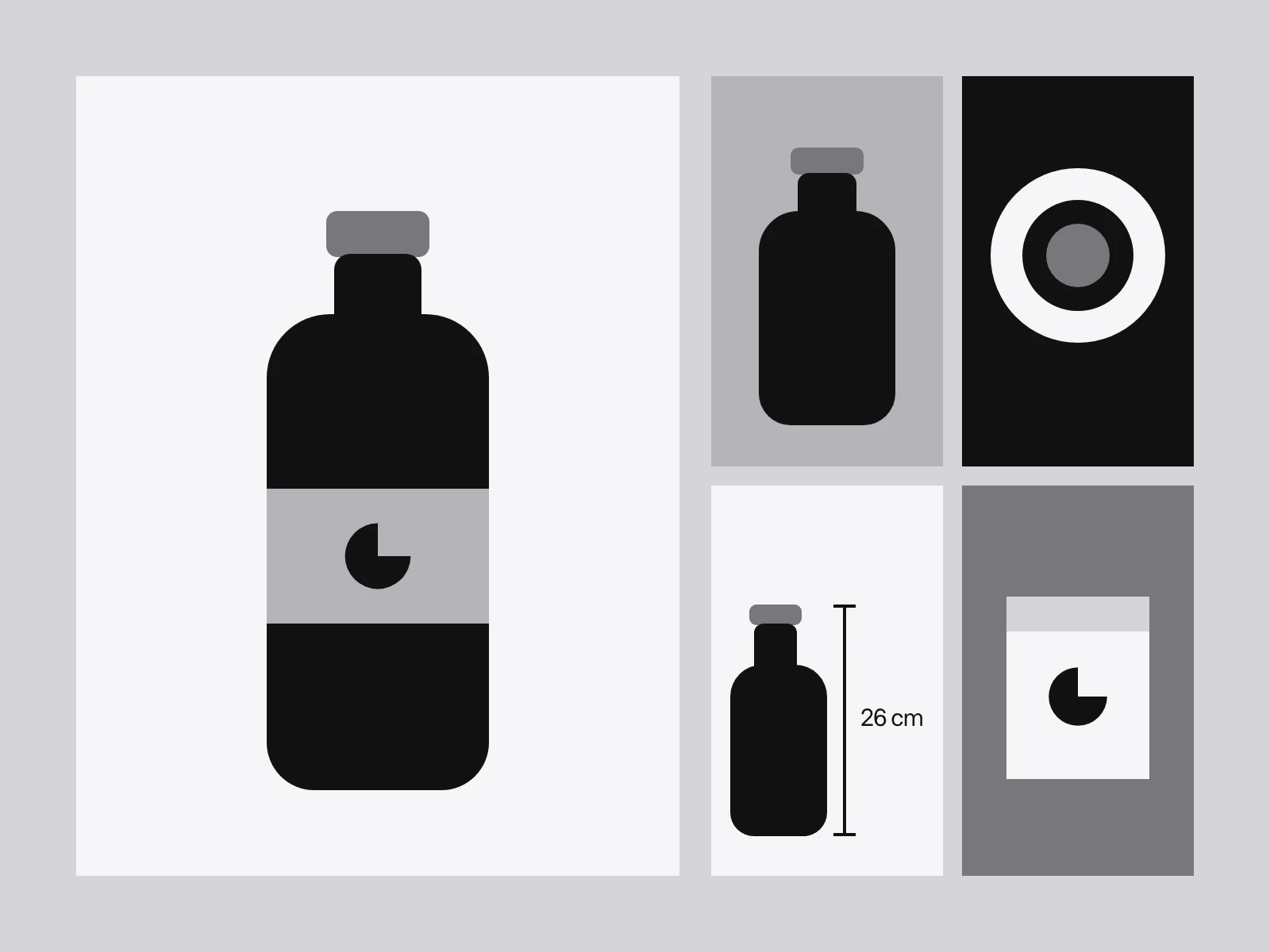
Baymard Institute's testing found that 42% of users try to judge a product's size from its images, and that without a scale cue some drew wrong conclusions and dropped products that would have fitted. In its 2017 benchmark of 60 large sites, 28% had no in-scale image among their best sellers. In its current, larger benchmark that figure is 37%. The samples differ, so it is not a trend. Baymard also found that 56% of test subjects looked at the product images first on a new page, before the title or description.
An in-scale image shows the product against something of known size: a person, a hand, a familiar object or a room. Wearables need a model; 23% of benchmarked sites have none. Computer-generated scale images are a supplement, not a replacement, and a video does not replace the still, because many people do not play product videos. On a phone, Baymard's 2016 benchmark of 50 mobile sites found 40% failed to support pinch or double-tap zoom, and it advises loading a higher-resolution picture when zoom starts.
The pixel sizes are simple arithmetic. A main image shown 576 CSS pixels wide (40% of a 1440 px window) needs 1,152 px at a screen density of 2. A phone image shown 358 px wide (a 390 px screen with 16 px margins) needs 716 px at density 2 and 1,074 px at density 3. Offer widths of 640, 960, 1280 and 1600 px in srcset, and keep the 1600 for zoom.
The main image is usually your slowest element
On a product page the first gallery image is usually the Largest Contentful Paint element, and three rules from web.dev decide whether it is fast:
- Never lazy-load it. web.dev says this will always add unnecessary resource load delay.
- Put
fetchpriority="high"on one or two images at most, andfetchpriority="low"on off-screen gallery slides, so bandwidth goes to the right file. - Keep it discoverable in the HTML. A CSS background image, or a gallery script that inserts the image later, hides it from the browser's preload scanner.
web.dev's guideline splits LCP into four parts, roughly 40% time to first byte, under 10% load delay, 40% load duration and under 10% render delay. Take a 2.5 s target (the "good" threshold in the Core Web Vitals guide): 40% is 1.0 s for the image to download. Lighthouse simulates a mobile connection at 1.6 Mbps, which moves 200 KB in a second. So a first image near 200 KB is the working budget on that profile. The 40% split is a guideline, not a rule, and the budget is our arithmetic on top of it.
Doubt two: what will it really cost
In Baymard's latest list of reasons for abandoning a checkout (US online shoppers, "just browsing" excluded), 40% said extra costs such as shipping, tax and fees were too high, 20% said delivery was too slow, 18% were forced to create an account and 12% could not see or calculate the total order cost up front. A February 2024 Baymard survey of US adults, reported by eMarketer, gave 48% for extra costs, so the figure is 40 to 48% depending on who is counted.
The page-level finding is blunter. Baymard's benchmark shows 67% of sites give no estimate of total order cost near the buy section, and it recommends showing the lowest full order cost on the product page by default. The same benchmark found 81% of sites selling variable quantities miss a price per unit, and 44% give no returns link from the main product content. Put delivery cost, delivery date and the returns link in the buy box, not in the cart.
Doubt three: what did other buyers find
Baymard reports that 95% of users relied on reviews, and that the ratings distribution summary, the bars from five stars to one, was the most used feature of the reviews section. 43% of the 60 top-grossing sites lack one. Baymard's specifics:
- Make the bars filters, expanded by default and single-choice, because test users never viewed more than one rating at a time.
- Hide the summary when there are five or fewer reviews.
- Expect negatives to be read. 53% of test users actively looked for negative reviews. Without the distribution, a page of only 5-star reviews looks fake, and a first page of mostly negative ones looks worse than the truth.
Northwestern's Spiegel Research Center reports that purchase likelihood typically peaks at ratings of 4.0 to 4.7 and declines as the average nears 5.0, and that a product with five reviews is 270% more likely to sell than one with none. The page does not state the data behind these figures, so treat the 270% as indicative. The reasoning for the 5.0 dip is sound, and we can show it. Pull each average toward a neutral 4.0, with the pull worth five ratings (our choice of prior):
| Average and count | Adjusted score |
|---|---|
| 5.0 from 2 ratings | 4.29 |
| 4.5 from 12 ratings | 4.35 |
| 4.6 from 240 ratings | 4.59 |
On this arithmetic 4.5 from 12 ratings is the better estimate of quality than 5.0 from 2, which matches Baymard's survey where people preferred a 4.5 average with 12 ratings to a 5.0 with 2. Show the count next to the average. Do not hide 4.2.
The buy box
Group name, price, options, delivery, returns and the button in one area, in the order of the shopper's questions.
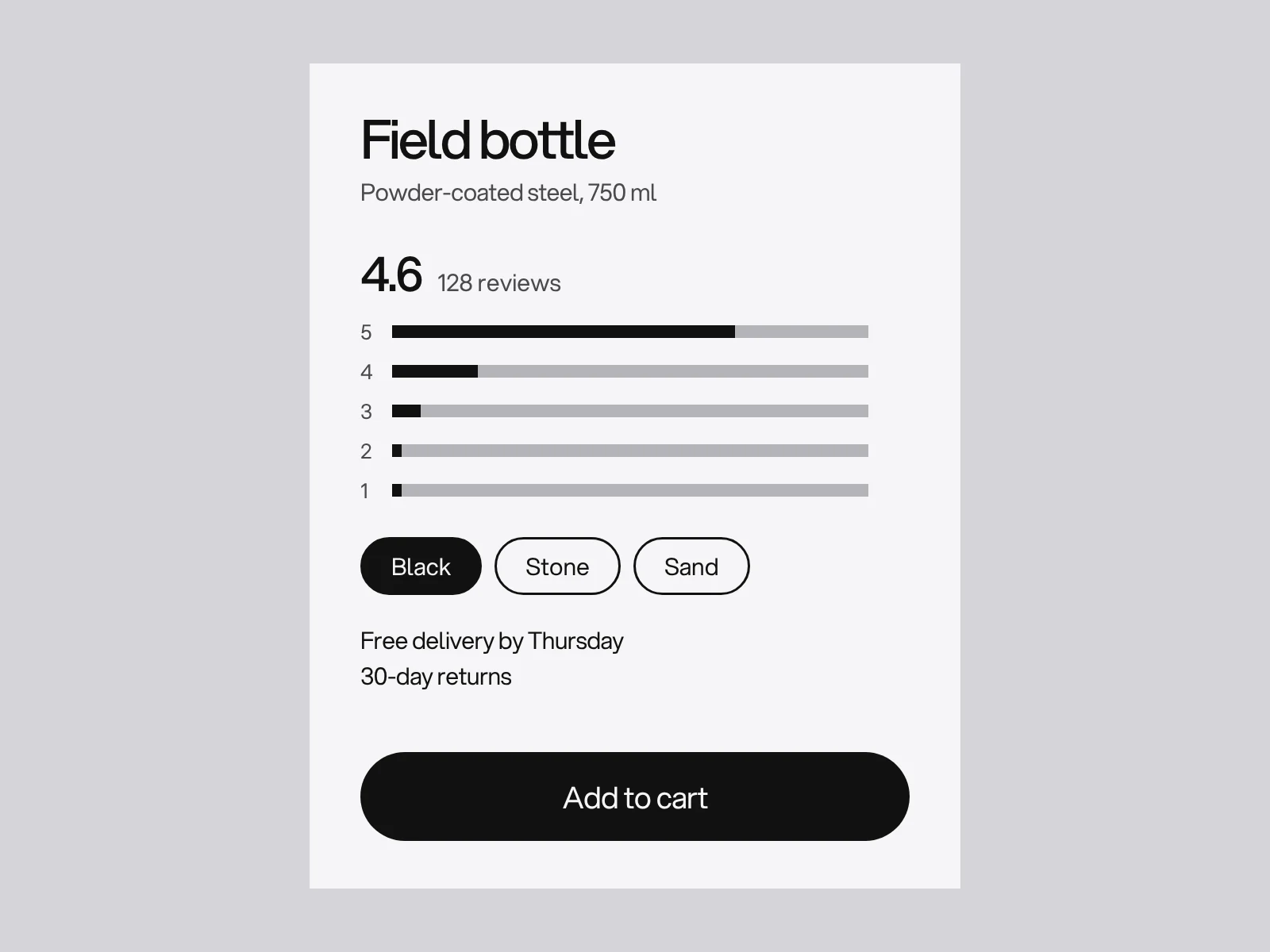
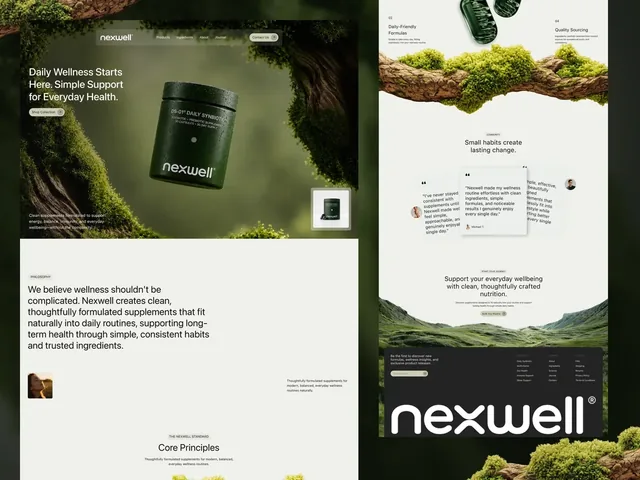
For sizes, Baymard's 2021 benchmark found 71% of desktop sites use buttons and 28% a dropdown. A dropdown hides availability, testers overlooked it, and the missed selector produced an error after Add to cart. With many sizes on a phone, Baymard suggests grouping them by type or a swipeable row, and says the nested version is untested. The product pages in Nexwell and RUS are design work, not live shops. Nexwell's puts a buy box in soft glass in one corner of a single-jar page, alongside an ingredients list, four promises and what customers say. RUS is monochrome everywhere except its product page, where colour returns because the clothes are the point, a good rule for any shop: keep colour accurate where it decides the sale.
Price display that can be unlawful
If you sell to consumers in the EU, a strikethrough price is regulated. Under Article 6a of Directive 98/6/EC, as amended by Directive (EU) 2019/2161 and applied since 28 May 2022, a price reduction announcement must use the lowest price applied in the 30 days before the reduction. On 26 September 2024 the Court of Justice (case C-330/23, Aldi Süd) ruled that this also governs a percentage figure or a "price highlight". In the case, a strikethrough of 1.69 euros stood beside a 1.29 euro offer, and the lowest price in the last 30 days was also 1.29 euros. The Court held that the percentage itself must be calculated from the 30-day low.
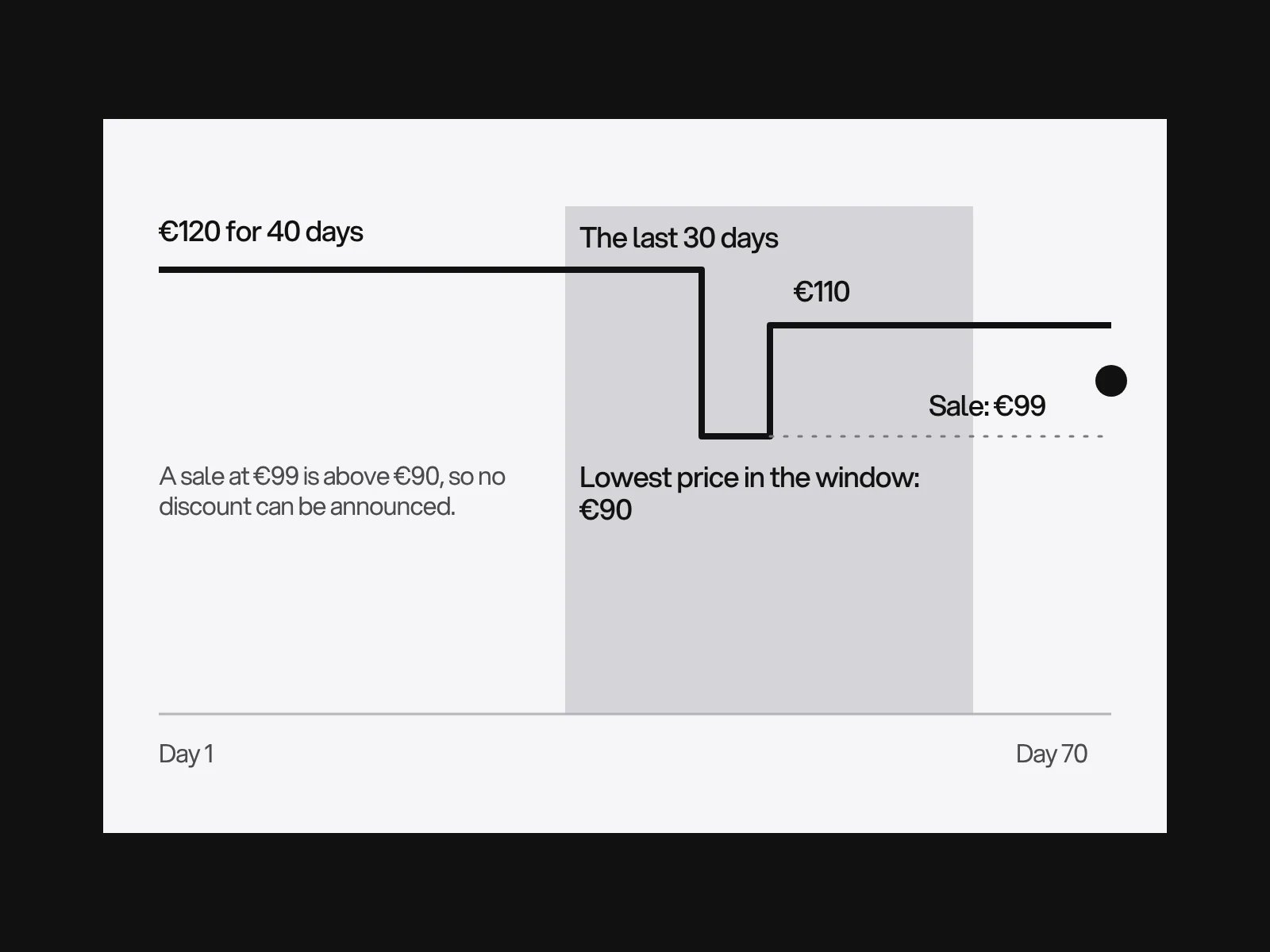
Our worked example, with invented prices: 120 euros for 40 days, 90 euros for 5 days, then 110 euros for 25 days. The lowest price in the last 30 days is 90 euros. A sale at 99 euros is above it, so no reduction can be announced, and "was 120" is not a lawful reference. A sale at 79 euros is a 12.2% reduction from 90 euros ((90 minus 79) divided by 90), and that is the percentage you may show. Member states have some options, for example for goods that spoil fast or are new, and this is not legal advice. Outside the EU, check your local rules.
Markup: what Google requires and the variant trap
For a merchant listing, Google's documentation requires a product name, an image and an offer with a price above zero and a three-letter ISO 4217 currency. Availability, shipping details and a return policy are recommended, and Google suggests a site-wide return policy under Organization markup. Only pages where a shopper can buy the product qualify, the page must focus on one product, and each currency needs its own URL.
Variants are where shops go wrong. Google's variant documentation uses ProductGroup with variesBy, hasVariant and productGroupID, and supports colour, size, suggested age, suggested gender, material and pattern. Every variant needs a unique ID such as a SKU or GTIN, and a distinct URL that preselects it. Google also warns that markup generated by JavaScript can make Shopping crawls less frequent and less reliable, which matters for price and availability. Render the markup on the server, and keep it equal to what the page shows.
Where product pages go wrong
| Symptom | Likely cause | How to detect it | Fix |
|---|---|---|---|
| Returns marked "wrong size" | No scale image or size help | Returns reason codes | In-scale image, size guide beside the selector |
| Carts abandoned at the shipping step | Costs first appear in the cart | Funnel from cart to shipping | Estimate in the buy box |
| Slow first screen | Hero image lazy-loaded or in CSS | Lighthouse "LCP element" | Remove lazy, add fetchpriority, use img |
| A 5.0 average looks fake | Few ratings, no distribution | Read the page as a stranger | Show the count and bars |
| Sale label challenged | Reference is not the 30-day low | Check price history | Compute from the lowest price |
| Variants missing from Shopping | Late JSON-LD, shared URL | Rich results test | Server-side markup, URL per variant |
A pass or fail checklist
- At least one in-scale image: pass if size can be judged without the text.
- Zoom works by pinch and double-tap on a phone.
- The first image is not lazy-loaded and is about 200 KB or less for a phone.
- An order cost estimate and delivery date sit in the buy box.
- Ratings show the count and a clickable distribution.
- Any reduction is calculated from the 30-day low, where the rule applies.
- Markup has name, image, price, currency and availability, and each variant has an ID and URL.
Product pages sit inside a wider website project, and the copywriting guide covers the description. The platform decides how much of this you control, as in Webflow vs WordPress. Auralee, the e-commerce website design for a Tokyo fashion label, leans on black and white photography and one lime. To talk about a shop, get in touch.
Frequently asked questions
How many images should a product page have?
The research we could read gives a coverage rule rather than a count. Show the product clean and large, a detail, one image in scale, a model for anything worn, and the contents of the box. At least one in-scale image matters most: 42% of users try to judge size from the pictures.
Should the product page show the total cost including shipping?
Yes, as an estimate near the buy button. Baymard found 67% of sites give none, while 40% of shoppers who abandoned a checkout (excluding browsers) said extra costs were too high, and 12% could not see the total cost up front.
Is a 5.0 star rating the best score for a product?
No. Northwestern's Spiegel Research Center reports that purchase likelihood peaks at about 4.0 to 4.7 stars and falls as ratings approach 5.0, because perfect scores look too good to be true. Show the number of ratings and a distribution as well.
Can I show a was price and a percentage discount?
In the EU, only against the lowest price you applied in the previous 30 days. The Court of Justice confirmed on 26 September 2024 (C-330/23) that this includes percentage figures and price highlights. Elsewhere, local rules apply.
Should I lazy-load product images?
Not the first one. web.dev says never to lazy-load the Largest Contentful Paint image, which is usually the first gallery picture. Lazy-load the thumbnails and slides below the fold, and give the first image fetchpriority high.
What structured data does a product page need?
For a Google merchant listing: name, image, and an offer with a price above zero and a currency code. Availability, shipping and returns are recommended. For variants use ProductGroup with a unique ID and a distinct URL for each, rendered on the server.
Sources and fact check
Facts in this article that come from outside LAIN were checked on 28 Oct 2026 against:
- Baymard Institute: Product Page UX, All Products Need at Least One In Scale Image
- Baymard Institute: Current State of E-commerce Product Page UX
- Baymard Institute: Ratings Distribution Summary
- Baymard Institute: Always Use Buttons for Size Selection
- Baymard Institute: Mobile Image Gestures
- Baymard Institute: Cart Abandonment Rate Statistics
- Spiegel Research Center: How Online Reviews Influence Sales
- Court of Justice of the European Union: Press release 152/24, Aldi Süd (C-330/23)
- Google Search Central: Merchant listing structured data
- Google Search Central: Product variant structured data
- web.dev: Optimize Largest Contentful Paint
- Lighthouse: Throttling documentation
Timelines, services and process described here are LAIN's own, as set out on our About and FAQ pages.


[ Keep reading ]