[ Social media ]
Instagram Reels covers: a safe area that survives every crop
Design a Reels cover at 1080 x 1920, keep the title inside the middle 1080 x 1080 and faces inside the middle 1080 x 1350, and set the title at 91 px or larger so it reads in a grid tile on a 393 point phone. Instagram does not publish its crops, so check them on your own account with a calibration cover.
By LAIN11 min read
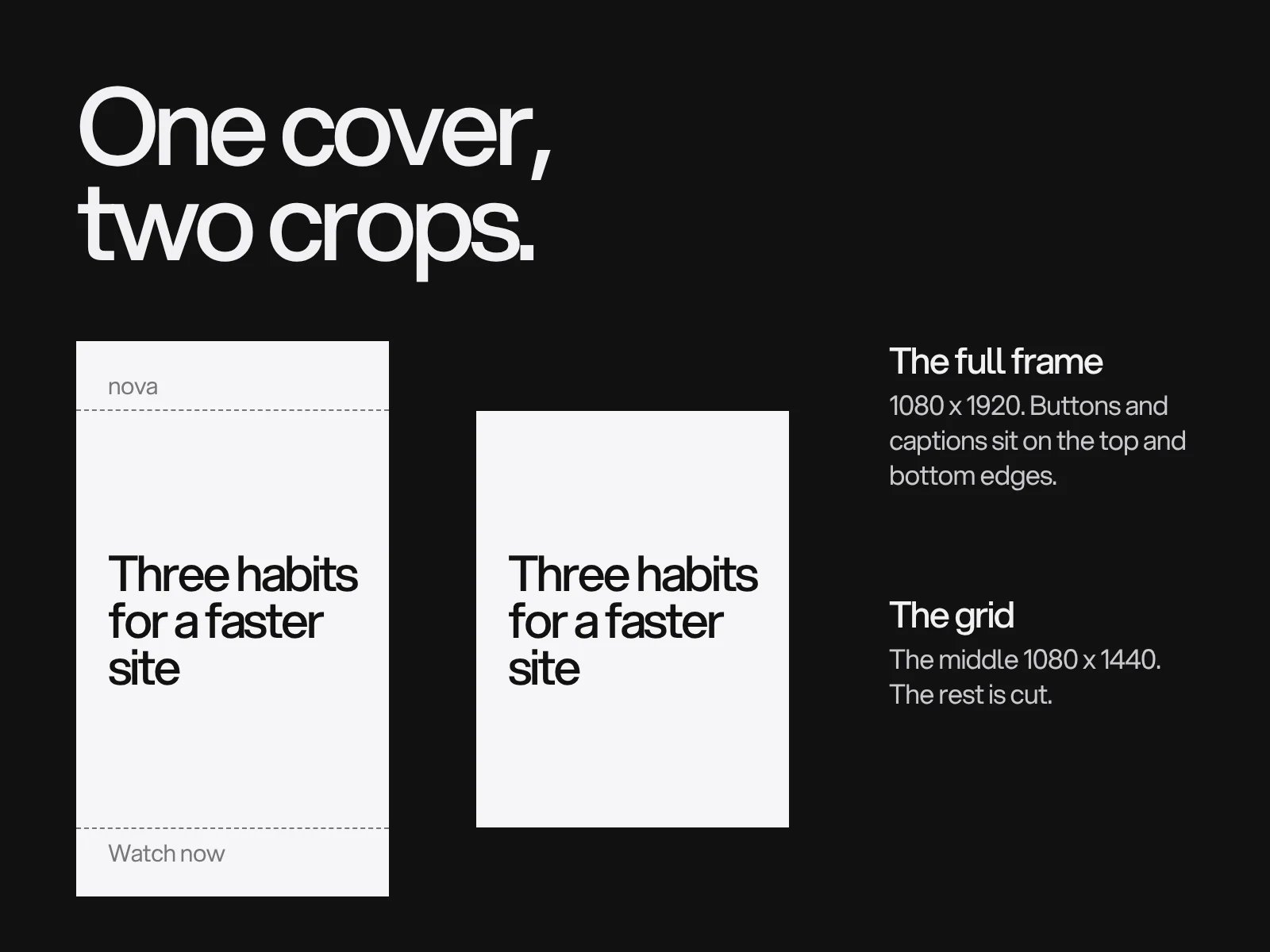
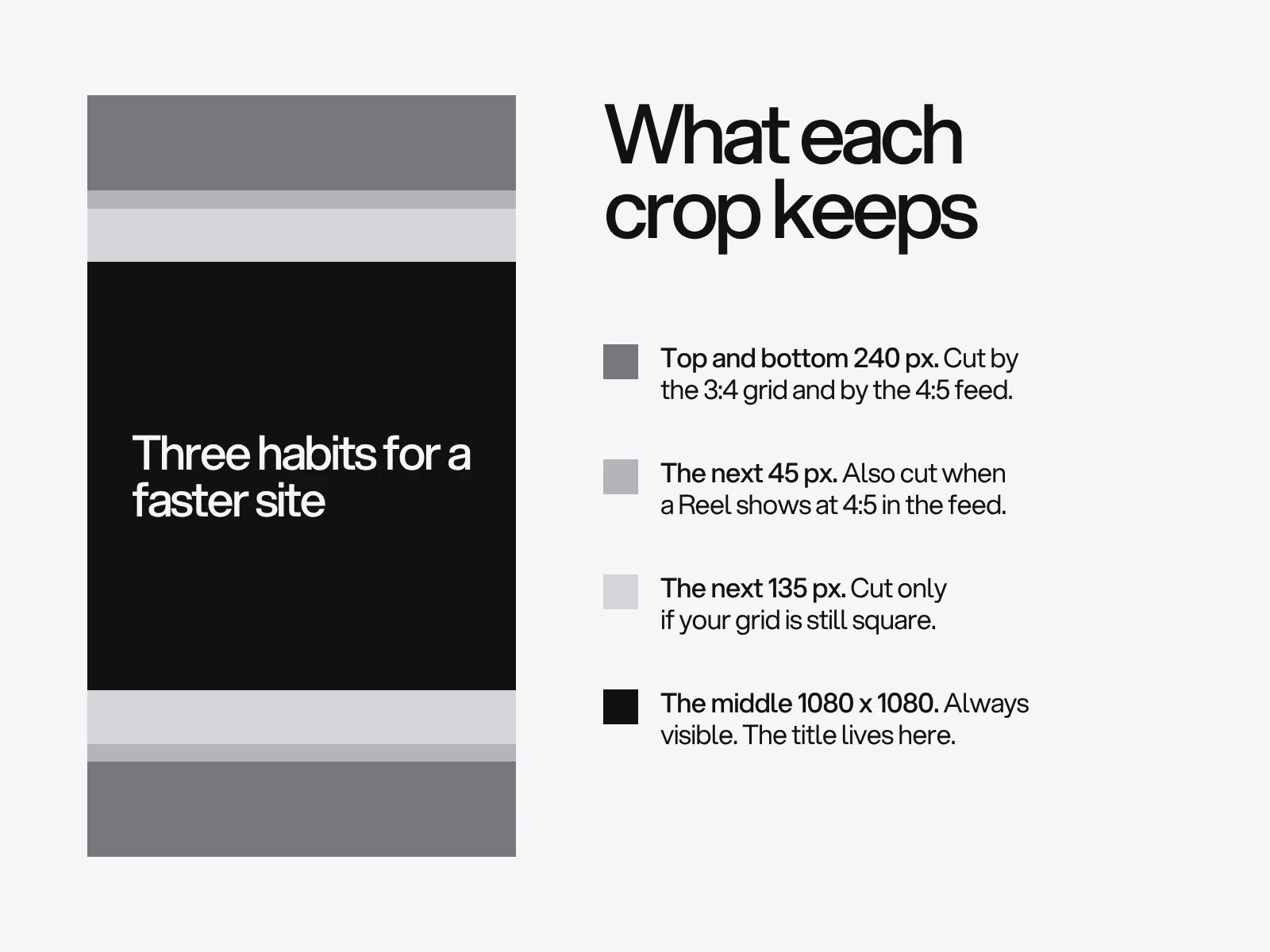
Instagram does not publish how a Reels cover is cropped, and the guides that do publish numbers disagree. What you can rely on is arithmetic. A 1080 x 1920 file loses 240 px at the top and the bottom in a 3:4 grid tile, 285 px in a 4:5 feed crop and 420 px if a grid is still square. The middle 1080 x 1080 survives all of them. This guide builds a cover template from that fact, sizes the title for a tile only 131 points wide and gives you a calibration cover, so you can check your own account instead of trusting a blog post, including this one.
One file, four possible crops
A cover is one image shown in different shapes. These are the shapes guides report. None of the figures comes from an Instagram help page we could read.
| Where it appears | Shape | What a 1080 x 1920 file keeps | Who says so |
|---|---|---|---|
| Reels tab, full player | 9:16 | All of it | Every guide |
| A Reel shown in the main feed | 4:5 | 1080 x 1350, 285 px gone top and bottom | Hootsuite and several tool vendors |
| Profile grid, current | 3:4 | 1080 x 1440, 240 px gone top and bottom | Kapwing's test, Hopper HQ; Engadget reported the test in August 2024 |
| Profile grid, older | 1:1 | 1080 x 1080, 420 px gone top and bottom | Hootsuite, Snappa and Argil still describe it |
Where the sources conflict, say so. Adam Mosseri explained the vertical grid by saying most uploads are now vertical and cropping them to squares was "pretty brutal" (as reported by Engadget). Kapwing found that every thumbnail is now centre-cropped to 3:4. Hopper HQ's blog and one of its help articles disagree with each other, 3:4 in one and 4:5 in the other, and a few large guides never updated from the square. Hopper dates the change to January 2025, but that is one source. The honest position: 3:4 is the most likely shape today, a square is possible on some accounts, and the only reliable fix is to design for the overlap and then test.
Two zones, not one safe area
The nesting is simple because the middle of each crop is the middle of the file: 4:5 sits inside 3:4, which sits inside 9:16. So there are only two numbers to remember.
- Title zone: the middle 1080 x 1080 (y 420 to 1500). Anything made of words goes here. It survives every crop in the table.
- Subject zone: the middle 1080 x 1350 (y 285 to 1635). Faces, hands and the main object may use this. It survives the 4:5 feed and the 3:4 grid, but not a square grid.
| If your grid tile measures | Words | Faces and objects |
|---|---|---|
| Taller than wide, 3:4 (height divided by width is about 1.33) | 1080 x 1350 is allowed | 1080 x 1350 (the 4:5 feed crop is the tighter one) |
| Square | 1080 x 1080 | 1080 x 1080 |
| You manage several accounts or are not sure | 1080 x 1080 | 1080 x 1350 |
Several guides say the cover editor lets you drag the cover inside the grid crop. It is called "Profile Grid" in some guides and "Crop Profile Image" in others. In a 3:4 grid that window can only slide through the 480 px of spare height (1920 minus 1440), so a template that centres its content survives the default placement, and a manual drag is an escape hatch, not a layout tool.
Size the title for a tile, not for the screen
Designers judge a cover on a monitor at 1080 px wide. A visitor sees it as one of three tiles. On a phone 393 points wide, a tile is about 131 points (393 divided by 3, gaps ignored). That is 0.121 points for each pixel of the file.
Apple's Human Interface Guidelines give 11 pt as the minimum text size on iOS and 17 pt as the default body size. Apple also says to test legibility in the real context and to set thin weights larger. Divide those by 0.121 and you have what a cover title must measure on the 1080 canvas:
| Phone width | 11 pt (minimum) | 17 pt (default body) |
|---|---|---|
| 375 pt | 95 px | 147 px |
| 393 pt | 91 px | 140 px |
| 430 pt | 83 px | 128 px |
A cover title at 91 px or more passes the minimum on all three. Treat 91 px as a floor, because Apple's numbers are for interface text that people choose to read, and a grid title has to be read in a glance. Aim for 104 to 140 px.
This also explains the usual advice of three to five words. It is not taste, it is what fits. In a 960 px text box (1080 minus 60 px margins), set in a medium grotesque (we measured Inter Medium), a six word title such as "Three habits for a faster site" takes two lines at 91, 104 and 120 px and three lines at 140 px. An eight word title needs three lines from 104 px up.
Contrast needs more than the headline rule. WCAG asks for 4.5:1 for normal text and 3:1 for large text, defined as 18 pt, or 14 pt bold, as rendered. Rendered in the tile, a title is far smaller than on your canvas. By our reading, a bold title would have to be about 154 px on the 1080 canvas to count as large text in a tile, so use 4.5:1. Examples we calculated: near black #121212 on #d4d4d8 is 12.7:1 and passes easily, while a mid grey #77777c on a light #f6f6f7 is 4.1:1 and fails.
When the cover is also the first frame
A cover and the video's first seconds are different objects with different hazards. The cover is cropped by grids. The video is covered by the player: the profile name, caption, audio label and the button rail. If you upload a separate cover, the player overlay does not touch it. If you burn the title into the first seconds of the video, it does.
Guides disagree on how much the player covers:
| Source | Top | Bottom | Sides |
|---|---|---|---|
| Outfy | 108 px | 320 px | 60 px left, 120 px right |
| Lilach Bullock | 250 px | 340 px | not given |
| Hopper HQ (converted from percentages it attributes to Meta) | about 270 px | about 670 px | button rail on the right, roughly the right fifth |
We could not confirm any of these on a Meta page, and the spread in the bottom margin, 320 to 670 px, is too wide to average. The safe choice is the strictest. For a title that stays in the video, use y 420 to 1250, which is the title zone cut at Hopper's 670 px bottom margin, and keep it off the right-most 230 px in the lower half. Ads Manager has a safe zone overlay for ads, which at least shows Meta's own version.
One more fact from a primary source. Meta's announcement of Trial Reels says a trial Reel is shown to non-followers first and does not appear on your profile grid or Reels tab unless you share it. A trial Reel, then, is judged on its first second, not on its cover.
On the case page for Mavelle, the cover is a short clip, and its still image is a frame taken 2.1 seconds in, picked deliberately rather than the first frame. The same habit is worth copying for covers: the first frame of a clip is rarely its best still.
Template and cover types
Build the template at 1080 x 1920 in the tool your team uses. These are the numbers:
| Layer | Setting |
|---|---|
| Guides | Horizontal lines at y 240, 285, 420, 1500, 1635, 1680 |
| Text box | 960 px wide (60 px side margins), inside y 420 to 1500 |
| Title | 91 px minimum, 104 to 140 px target, medium or bold, three lines at most |
| Series number | One number, 300 to 500 px high, always the same corner of the title zone |
| Subject | Faces and hands inside y 285 to 1635 |
| Backgrounds | Two colours and one image treatment |
| Logo | Leave it out: the profile header already says whose account it is |
| Export | PNG, 1080 x 1920, sRGB, named by date and title |
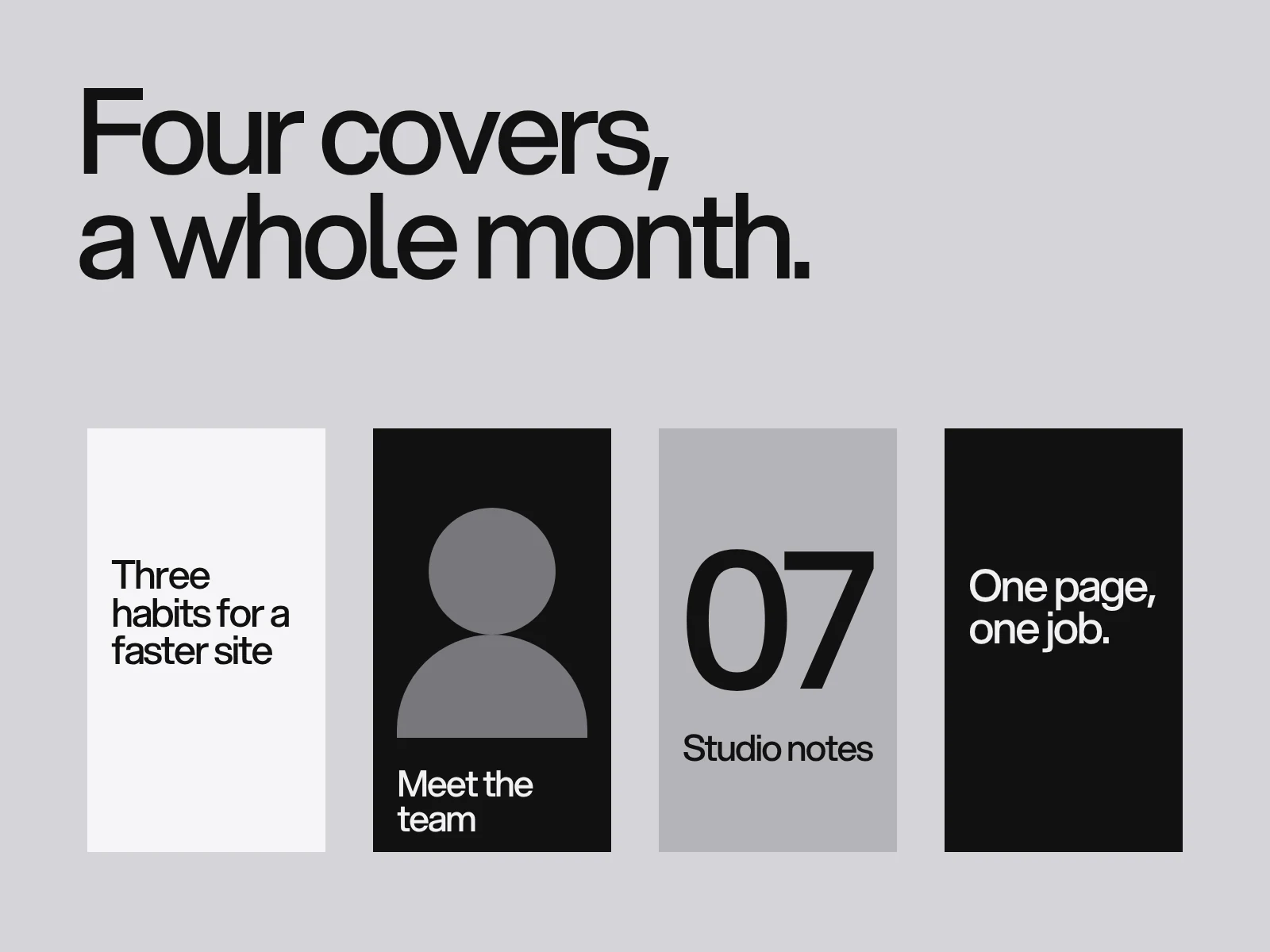
Four cover types cover most needs: a title cover (the workhorse), a face cover (a person plus a short title), a series cover (a number or a label so a Reel reads as part of something) and a quote or number cover. To stop a grid reading as one design nine times, move one variable at a time, such as the background or the photograph, while the title size, the position and the number stay fixed. The Monolith page says it about its gig posters: no two are alike, and the wordmark and the pink make them a series. That is the rule for a cover set too.
Calibration cover: ten minutes that replace guessing
Make a 1080 x 1920 image with a thin line every 120 px, each numbered (120, 240, 360 and so on) in 60 px type, and extra lines at 240, 285, 420, 1500, 1635 and 1680. Post it as a Reel on a test account, or post it and delete it a minute later. Do not use a Trial Reel, because it stays off the grid. Then look at the grid tile. The first number you can read at the top tells you how much your grid cuts. Drag it in the cover editor to see how far the window moves. Screenshot your grid and keep the result in the template file.
The same test settles the question of changing a cover later. Hopper HQ says Instagram does not allow it. Hootsuite, Pippit and SocialBu describe how to do it, SocialBu adds that it does not change views, and a Sprout Social community thread from March 2025 reports the cover editor failing to open for some people. Treat editing as possible and unreliable: get it right before posting, and use an edit only to fix a crop.
Where this goes wrong
- The title is unreadable in the grid. Cause: it was judged at monitor scale, and a tile is 0.121 of that. Detect: export the cover at 131 px wide (262 px for a sharp screen) and read it without zooming. Fix: raise the title to at least 91 px and cut words until it fits in two or three lines.
- A face or hand is clipped. Cause: the cover was chosen as a frame from a video composed for the full player. Detect: crop the frame to 3:4, then to 4:5, before you choose it. Fix: pick a frame whose subject sits inside y 285 to 1635, or upload a designed cover.
- The grid looks like nine accounts. Cause: no rule says which variable may move. Detect: put the last nine covers in a 3 x 3 sheet at 131 px per tile. Fix: lock title size, position and number, and rotate only the background or photograph.
- The cover says one thing and the Reel starts with another. Cause: the cover was made after the edit. Fix: use the cover's headline as the first spoken or written line in the Reel.
- A pixel number from a guide is wrong for you. Cause: Instagram changes crops in tests and rollouts that guides track slowly, and the guides copy each other. Fix: rerun the calibration cover every few months and when the app's grid changes.
Checklist before you post
- File is 1080 x 1920, with guides at 240, 285, 420, 1500, 1635 and 1680.
- Title is 91 px or more, five words or fewer, inside y 420 to 1500, and at 4.5:1 contrast or better.
- Faces and hands sit inside y 285 to 1635.
- If the title is also in the video, it sits inside y 420 to 1250.
- The last nine covers still look like one account in a 3 x 3 sheet.
- The calibration result for your account is saved in the template file.
We design cover systems as part of social media design, alongside the profile, the carousel templates and the wider template system. If you want a cover set your team can reuse every week, start a project.
Frequently asked questions
What size is an Instagram Reels cover?
Upload 1080 x 1920 pixels (9:16). Guides report that Instagram then crops it: to 3:4 in the profile grid (1080 x 1440), to 4:5 when a Reel shows in the feed (1080 x 1350), and to a square on older grids. Keep words inside the middle 1080 x 1080 and faces inside the middle 1080 x 1350.
Does the Instagram profile grid crop Reels covers to 3:4 or to a square?
Most current sources say 3:4: Mosseri said in 2024 that most uploads are vertical, Engadget reported the test and Kapwing found every thumbnail centre-cropped to 3:4. Some guides still describe a square, and Instagram publishes no crop table, so post a numbered calibration cover and read your own grid.
How big should the text on a Reels cover be?
At least 91 px on the 1080 px canvas. A grid tile on a 393 point phone is about 131 points wide, so 1080 px shows at 0.121 points per pixel, and Apple's 11 point minimum for iOS text becomes 91 px. Aim for 104 to 140 px, three to five words, at 4.5:1 contrast.
Can I change a Reels cover after posting?
Sources disagree. Hootsuite, Pippit and SocialBu describe editing the cover from the Reel's menu, Hopper HQ says Instagram does not allow it, and a Sprout Social community thread reports the editor failing to open for some users. Treat editing as possible but unreliable and get the crop right before you post.
Where do the Reels safe zone numbers come from?
Mostly from guides, not from Instagram. Outfy gives 108 px top and 320 px bottom, Lilach Bullock 250 and 340, and Hopper HQ converts percentages it attributes to Meta into about 270 px and 670 px. They matter for text burned into the video, not for a separately uploaded cover, and the safest choice is the strictest.
Do Trial Reels show on my profile grid?
No. Meta's announcement says a Trial Reel is shown to non-followers first and does not appear on your profile grid or Reels tab unless you choose to share it with everyone. Its first second matters more than its cover until you share it.
Sources and fact check
Facts in this article that come from outside LAIN were checked on 28 Oct 2026 against:
- Hopper HQ: Instagram Reel size in 2026, aspect ratio and safe zones
- Engadget: Instagram's experimental profile grid has rectangular images instead of squares
- Kapwing: Instagram's new grid layout, size and dimensions
- Apple: Human Interface Guidelines, Typography
- Use Your Loaf: iPhone 15 screen sizes
- Meta: Test content with non-followers using Trial Reels
- Hootsuite: Instagram Reel size and cover guidance
- Outfy: Instagram safe zone
- Lilach Bullock: Ideal size for Instagram Reels, avoid cropping
- Sprout Social community: Reels cover editing problems
- SocialBu: How to add a thumbnail to scheduled Instagram Reels
- Ads Uploader: Meta ads safe zones
- W3C: Web Content Accessibility Guidelines (WCAG) 2.2
Timelines, services and process described here are LAIN's own, as set out on our About and FAQ pages.
[ Keep reading ]